 Blog Kazawallet
You hold your budget in crypto, but Google demands payment in Dollars via Visa…
And this is where most startups in our region hit a wall. Don’t let the lack of an international bank card prevent you from establishing your official company email ([email protected]). The solution no longer requires withdrawing crypto to cash and then searching for a bank; it is now in your hands.
We will explain how to use the Kazawallet card to subscribe to Google Workspace using crypto, and how it acts as an instant bridge to exchange digital currencies into subscriptions for you and your entire team.
Why is Kazawallet the Best Solution for Your Startup?
You need a Visa card that accepts crypto top-ups, and managing company expenses requires flexibility that traditional banks don’t easily offer. Kazawallet provides the solution:
- Exchnage Crypto to Balance: You can deposit any digital currency for free (USDC, LTC, BNB, TRON, BTC, ETH, SOL, USDT, Toncoin) into your Kazawallet wallet, then exchange it with a click into a balance (USD/USDT/USDC) ready to top up the card.
- Separate Expenses: Instead of mixing business expenses with your personal card, dedicate a Kazawallet card for company payments.
- Reasonable Fees: Card creation is $5 (one-time fee), and fees are low and transparent (1.5% on top-up).
- Multi-User Support: Google Workspace charges based on employee count (User/Month). Kazawallet supports these payments thanks to high daily limits (starting from $10 up to $200,000), covering any cost.
- Security and Protection: The card supports the 3D Secure system, ensuring you receive a verification code (OTP) for every purchase to protect your balance.
- Full Control: You can freeze the card immediately after purchase to ensure no unwanted subscriptions are withdrawn, and unfreeze it whenever you wish.
You can read the full guide on Kazawallet card features, fees, and limits.
What Do You Need to Start?
To exchange crypto for a Google Workspace subscription, you need the following essentials:
- A verified Kazawallet account: To use deposit and card services, your account must be fully verified (KYC).
- Crypto balance: Whether this balance is already in your Kazawallet (like BTC, ETH, SOL…), or you have crypto in an external wallet that you will deposit now for free.
- Kazawallet card: The virtual card must be issued. If you don’t have one, follow the guide on how to issue a Kazawallet card.
- Google Workspace Account
How to Create a Google Workspace Account?
- You need a personal email to access the Google account (or create one during registration).
- A Domain Name (e.g., example.com); you can buy a domain during registration or use one you already own.
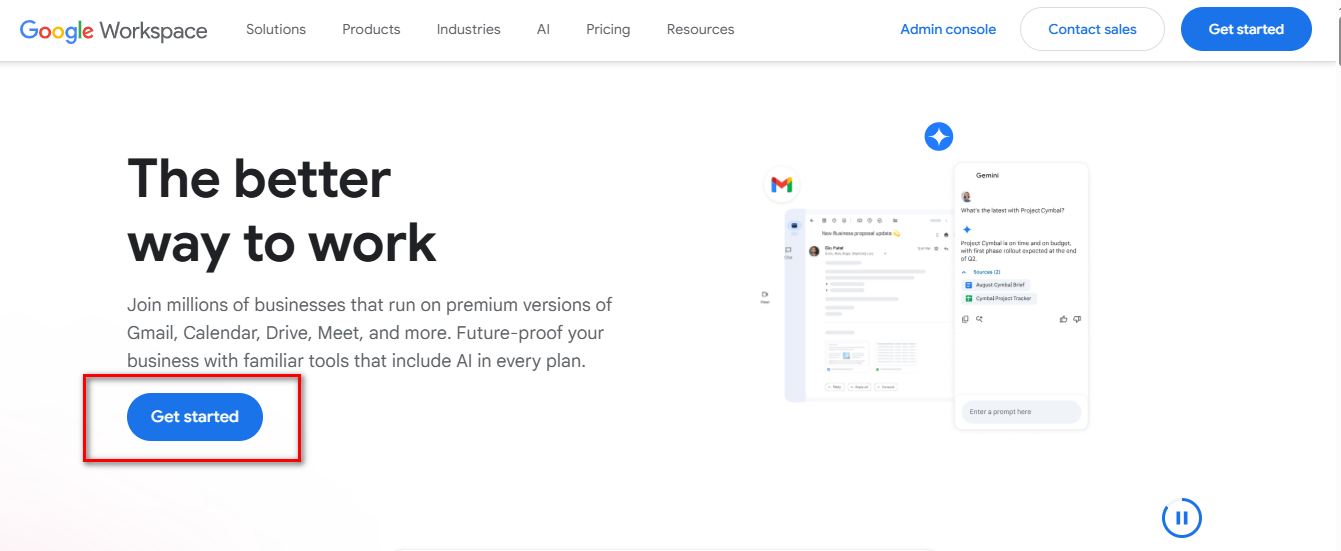
- Go to workspace.google.com and click Get Started.
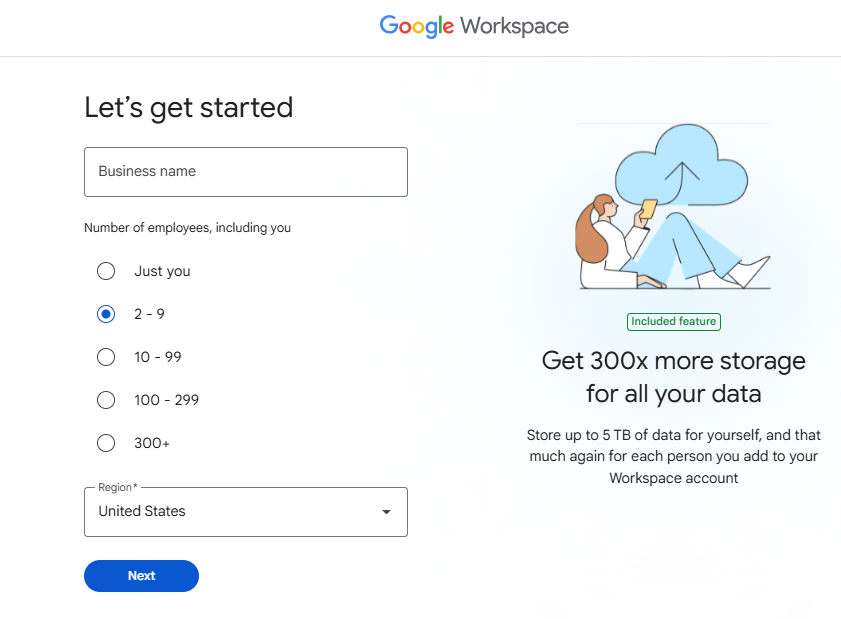
- Enter your company name, number of employees, and country.
- Enter the address information: (Check our guide on how to fill in the billing address for your Kazawallet card)
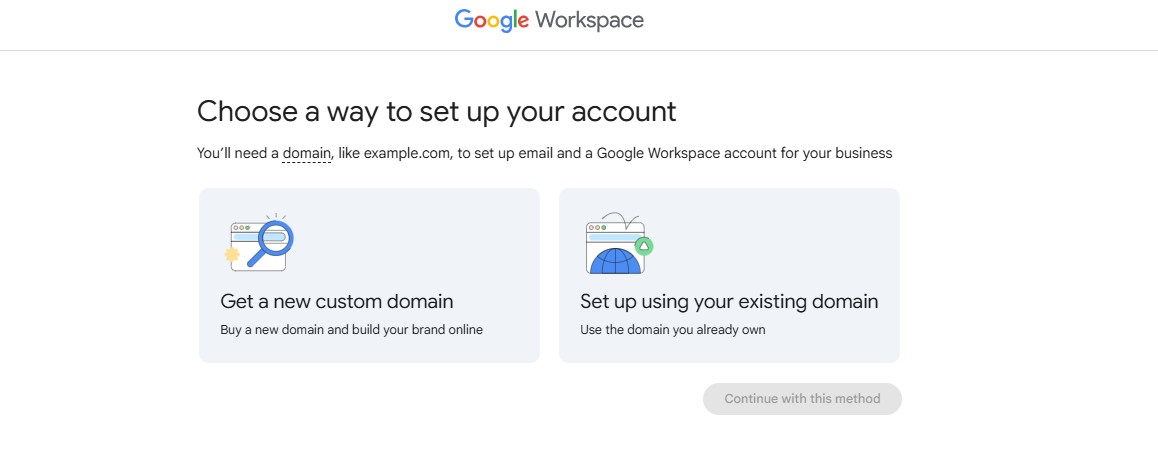
- Select “Get a New Domain” if you do not own one yet, or select “Set up using your existing Domain” if you already own one, and enter your active domain name.
-
-
Important Note: Please be aware that owning a Domain Name is a prerequisite to be able to register for and use Google Workspace.
-
How to Subscribe to Google Workspace Using Crypto?
The process boils down to a simple 3-step cycle: Deposit crypto, convert it, then pay with the card.
Phase One: Preparing and Topping Up the Kazawallet Card with Crypto
Here, you will convert the digital currencies you own into a balance ready for use.
- Deposit: Deposit the crypto you own (USDC, LTC, BNB, TRON, BTC, ETH, SOL, USDT, Toncoin) into your Kazawallet account. (Read How to Deposit Crypto into Kazawallet)
- Exchange: Go to the “exchange” section and exchange this crypto into a (USDT, USDC, or USD) balance.
- Top-up the Card: Top up your Kazawallet card with the balance you got from the previous conversion.
This way, your card is loaded with a balance that comes from your crypto, ready to make purchases.
Phase Two: Payment in Google Workspace
- Open Google Workspace.
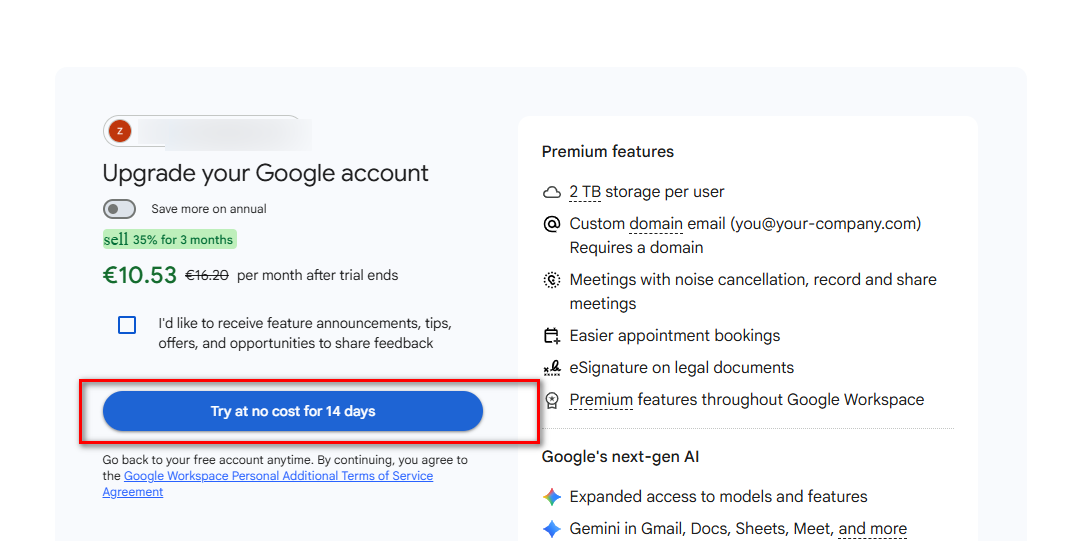
- Navigate to the 14-day trial and billing setup page.
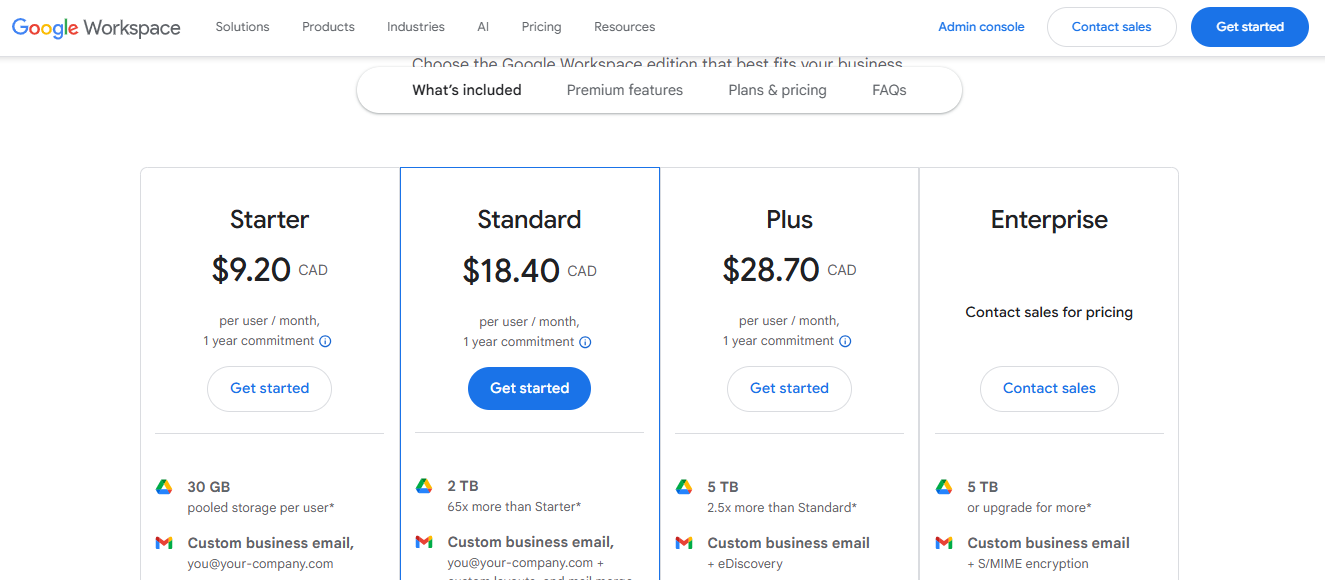
- Choose the plan (Starter or Standard).
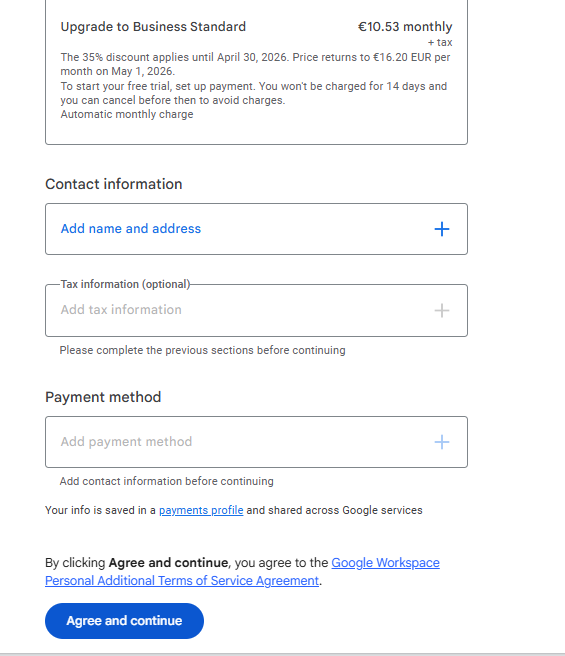
- In the Payment Method field, select Pay via Visa Card.
- Go to the Kazawallet app and copy your card details to enter them (Number, Name, Expiry Date, and CVV). (For more details, read: How to show Kazawallet card details).
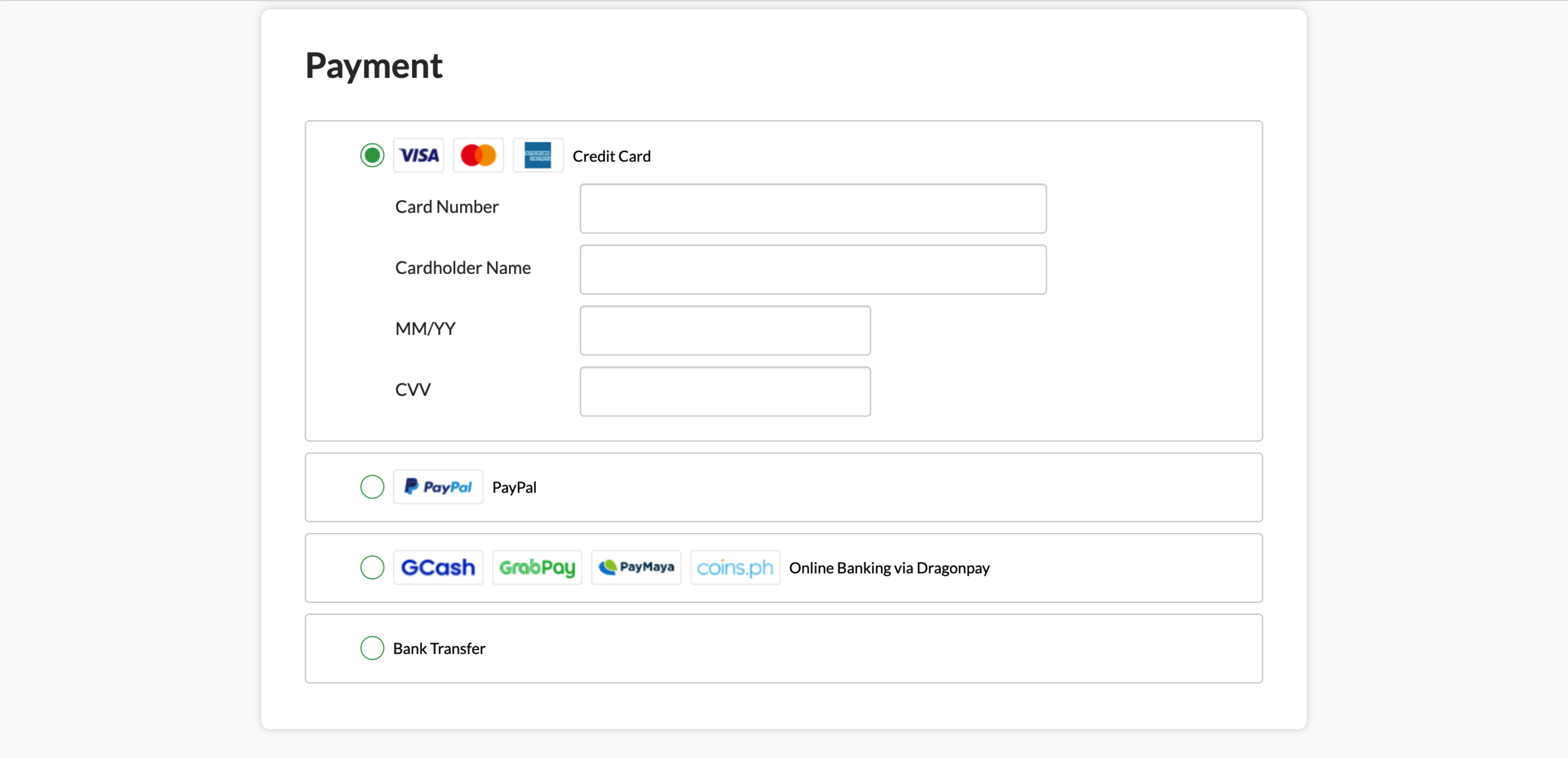
- Enter the address information: (Check our guide on how to fill in the billing address for your Kazawallet card)
- Confirm the payment process.
Tip: Annual Discount
Google offers two payment options:
- Flexible Plan: Pay monthly based on the number of users (slightly more expensive).
- Annual Plan: Commit to a full year and pay monthly or upfront (cheaper).
Use the Kazawallet card to pay for the full year upfront if liquidity is available. This gives you complete peace of mind from monthly crypto price fluctuations and ensures that company emails will never stop due to forgetting to top up the card.
Frequently Asked Questions (FAQ)
Can I use the card to pay subscriptions for 50 employees?
Yes. The Kazawallet card supports payments of up to thousands of dollars daily. Just make sure there is enough balance to cover the total amount (e.g., 50 employees × $6 = $300/month).
Does the card work for buying domains as well?
Yes, you can purchase a domain from GoDaddy or Google Domains using the same card during the registration process.
What cryptocurrencies are supported for deposit into Kazawallet and card top-up?
Kazawallet supports many major currencies such as (Bitcoin, Ethereum, USDT, USDC, SOL, BNB, LTC) and others. You can deposit any of them, convert them to a balance (USD/USDT/USDC), then top up the card.
Can I use the Kazawallet card to purchase in a different currency (like Turkish Lira, Dinar, Ruble, Euro)?
Yes, the card is a global Visa card. You top up in (USDT or USDC or USD) and can pay in any currency. However, note that in this case, a foreign transaction fee (FX Fee 2.5%) will apply if the payment is not in US Dollars.
In Conclusion
Managing a startup is hard enough; don’t make the payment method an additional burden. With Kazawallet, paying for Google subscriptions has become easier.
Exchange crypto, top up the card, and focus on growing your project while we handle the crypto payment side.