You can now easily send money to Syria and have it received as cash in USD or Syrian Pounds (SYP) via the Doviz network (Al-Etihad Company).
All you need to do is log in to the Kazawallet app, top up your account with your available local currency or cryptocurrency, and then head to the "Exchange" section to exchange your balance into the recipient's preferred currency (either USD or SYP).
Finally, submit a withdrawal request choosing the Doviz option. The recipient will receive a secure transfer number and can head immediately to the nearest branch in their province to collect their cash safely, without any complications or the need for a traditional bank account.
Why is Kazawallet the best option to send money to Syria?
Kazawallet has opened new horizons for expats with Doviz branch network. The platform offers competitive advantages that make it the ultimate first choice:
Flexible Receiving Currency: Recipients in Syria have the complete freedom to choose to cash out their transfer in either US Dollars (USD) or Syrian Pounds (SYP).
Comprehensive Geographical Coverage: Al-Etihad (Doviz) branches are spread across various Syrian provinces and regions, saving your family from traveling long distances to collect their funds.
Speed and Transparency: Transactions are processed instantly, and exchange rates along with fees are clearly displayed to the sender before confirming the operation, ensuring no unexpected deductions upon pickup.
How to send money to Syria?
We have designed dedicated cluster guides covering major expat markets and how to fund your account:
- From the USA: To learn how to deposit USD and liquidate it into physical cash for your family, read our guide: How to Send a Remittance from the USA to Syria the Easiest Way and Receive it via Doviz.
- From Germany: If you live in Europe, follow the Euro funding steps in our guide: How to Send a Remittance from Germany to Syria and Receive it via Doviz.
- From Lebanon: To easily transfer funds and bypass banking restrictions, check out our article: How to Send a Remittance from Lebanon to Syria the Easiest Way and Receive it via Doviz.
- From the UAE: To support your family by exchanging UAE Dirhams into cash instantly, visit our UAE Transfer Guide.
- From Russia: If you live in Russia and hold a Ruble or crypto balance, browse our Russia Transfer Guide.
Step-by-Step Guide: How to Send Money to Syria and Receive it via Doviz
The transfer process is divided into three simple phases that you can complete entirely from your mobile phone at any time:
Phase 1: Funding Your Kazawallet Account
Open the Kazawallet app and log in to your account.
Go to the "Deposit" section.
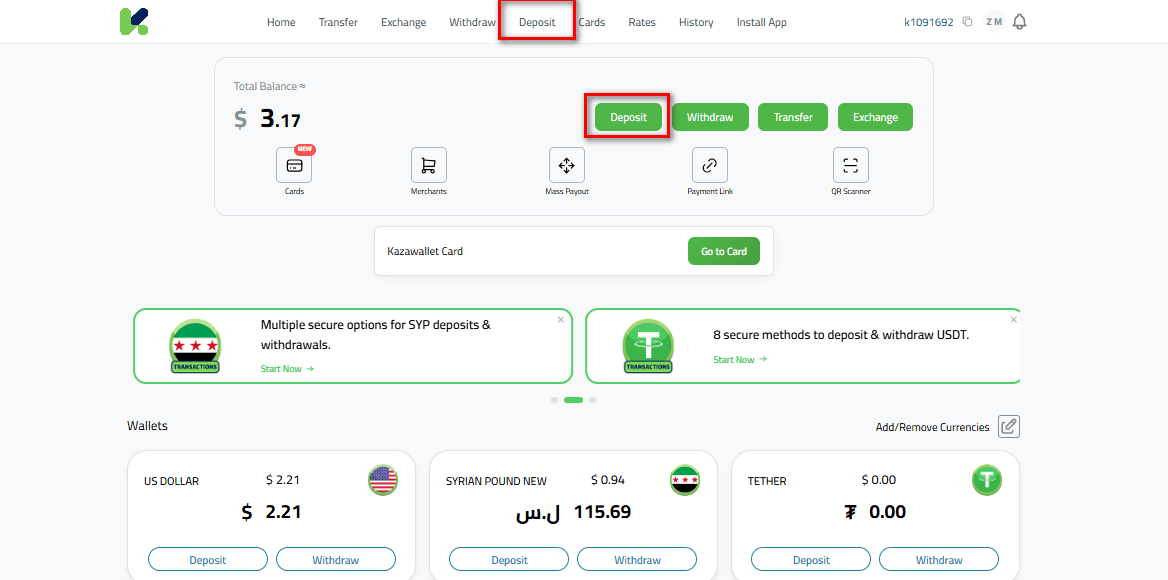
Choose your preferred currency (e.g., EUR, USD, or cryptocurrencies like USDT).
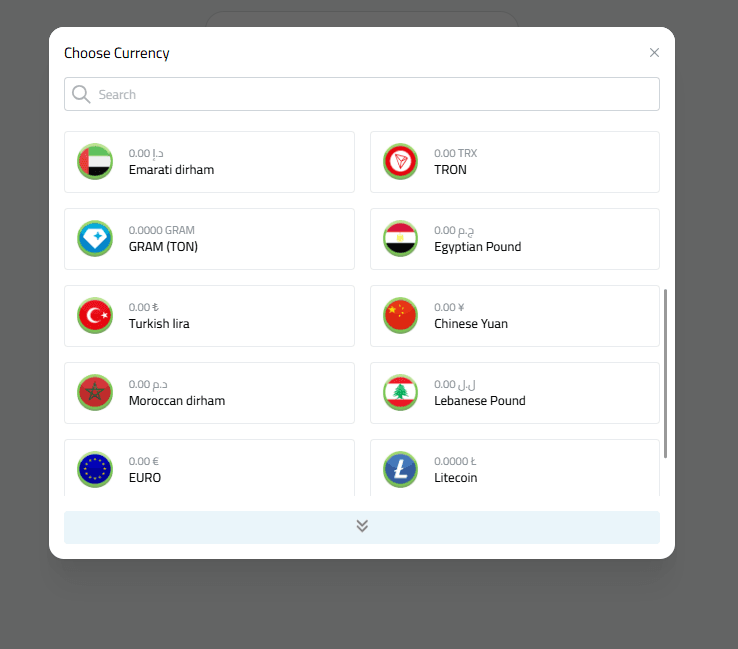
Select your preferred payment method (such as Rewarble cards, Volet wallet, or direct cryptocurrency deposit) and follow the instructions to complete the top-up securely and free of charge.
Phase 2: Exchanging the Balance to the Desired Receiving Currency
Before requesting a withdrawal, you must exchange your balance into the currency the recipient wishes to receive as cash in Syria:
Go to the "Exchange" section within the app.
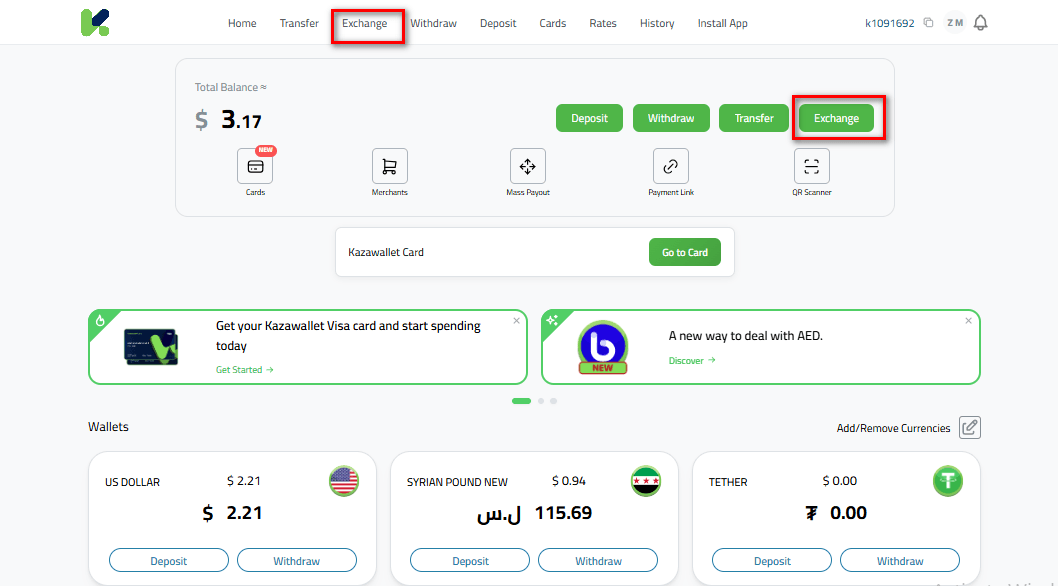
In the "Give" field, select the currency you currently have in your balance (such as EUR or USDT).
In the "Get" field, choose the final currency for pickup:
Select "US Dollar" (USD) if the recipient wants to receive USD cash in Syria.
Select "Syrian Pound" (SYP) if the recipient prefers to receive SYP cash.
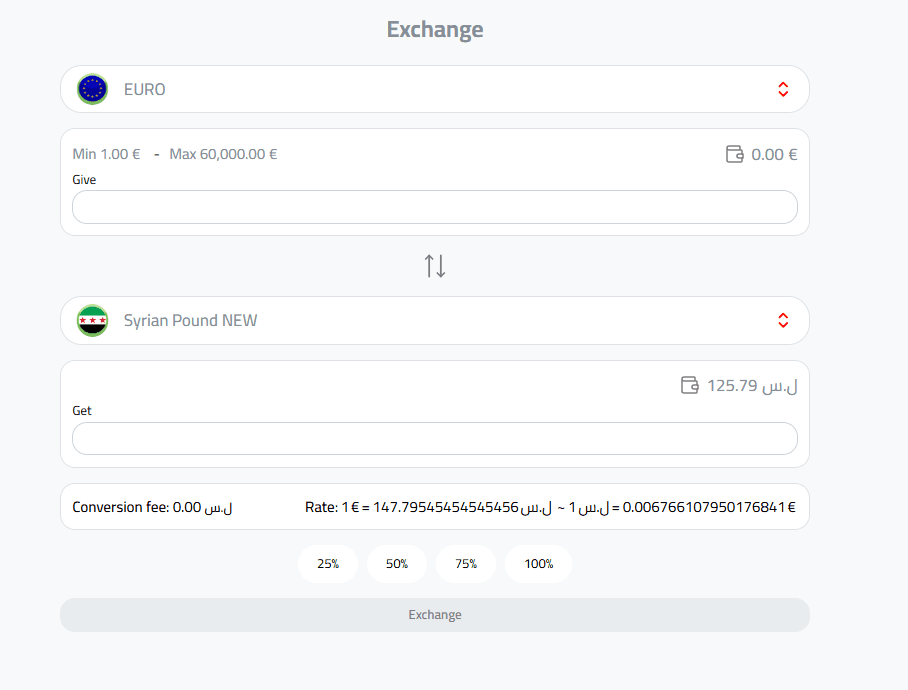
Enter the amount to be exchanged and confirm the transaction to complete the swap instantly at competitive and transparent exchange rates.
Phase 3: Setting Up the Withdrawal Request via Doviz (Al-Etihad Company)
Now that your balance is in the desired currency, it is time to send the transfer so it becomes ready for cash pickup in Syria:
Go to the "Withdraw" section in Kazawallet.
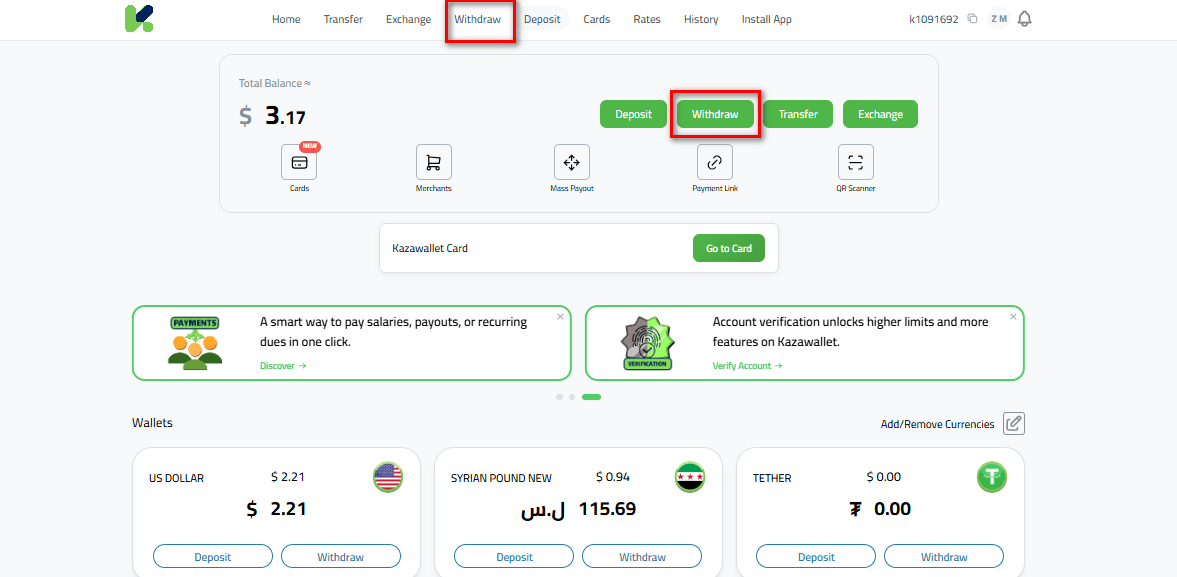
Select the withdrawal currency based on what you exchanged in the previous step (either USD or SYP).
From the available withdrawal options, select "Al-Etihad / Doviz" as your approved withdrawal method.
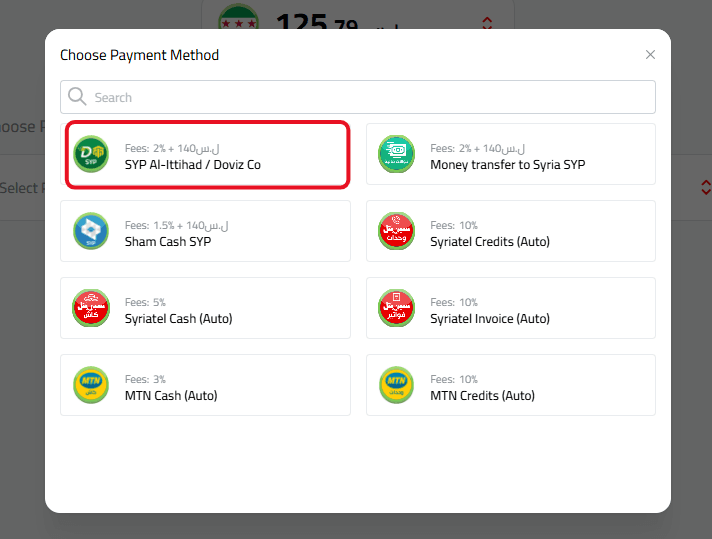
Fill in the required details with extreme accuracy (the recipient's full four-part name as shown on their ID, their Syrian mobile phone number, and the province or branch they wish to withdraw from).
Review the simple fees and commissions details, then press confirm. The system will process your request and issue a transaction code (MTCN) instantly.
How does the recipient in Syria withdraw the cash?
Once the request is processed and Kazawallet issues the transfer details, follow these steps:
Share the secure transfer number shown in your transaction details only with the designated recipient in Syria.
The recipient heads to the nearest Al-Etihad (Doviz) branch in their province, carrying their official personal ID and the transfer number.
The recipient provides the details to the employee and collects their cash immediately (in USD or SYP) without paying any additional fees at the counter.
How to send money to Syria and receive it via Doviz
In Conclusion
You can now send money from anywhere in the world right from the comfort of your home, reaching your family as cash with speed, security, and absolute transparency.
Try Kazawallet now and bring distant horizons closer!