You can link Kazawallet Visa card with a PayPal account by funding your account with your digital assets (such as USDT, Bitcoin, Binance, TRON, and others),
Exchange them within the wallet into a dollar-backed balance (USDT, USDC, or USD), load your card, and subsequently add it to your PayPal profile to activate instant online purchases with minimal processing fees.
Whether you hold the Basic Card tier or the advanced Premium Plus Card tier, both options grant you full operational capacity to link and verify your account and shop securely.
Why Choose the Kazawallet Visa Card to Link a PayPal Account with Crypto?
You require an international Visa card that accepts crypto funding to bypass local card declines and activate PayPal, powered by capital sourced directly from your digital currency wallet. Kazawallet bridges this exact framework:
Converting Crypto Earnings into Real-World Purchases: The Kazawallet card functions as an international Visa card built for real-time crypto funding. If you receive your freelance wages or commissions in USDT or cryptocurrencies, you can convert this digital income directly into checkout liquidity inside PayPal without withdrawing cash or searching for third-party local brokers.
Activating Your Profile for Free: Linking your card parameters to PayPal unlocks access to checkout across global storefronts that exclusively handle PayPal as a secure payment method, entirely free from monthly upkeep or hidden maintenance fees.
Flexible Limits and Transparent Fees: Processing rates are minimal and fixed (1.5% during card load operations), backed by substantial daily transactional caps that ensure you can cover both micro-purchases and large business expenses online.
Complete Asset Oversight and Safeguards: You can instantly freeze your card profile via the app dashboard right after a checkout to block unwanted recurring website renewals. The card is fully protected by the 3D Secure framework, dispatching an immediate OTP to your registered email to validate transactions and eliminate fraud.
You can read the full guide on Kazawallet card features, fees, and limits
Baseline Operational Pre-requisites
To link Kazawallet Visa card with a PayPal account, verify the readiness of the following:
- A verified Kazawallet account: To use deposit and card services, your account must be fully verified (KYC).
- Crypto balance: Whether this balance is already in your Kazawallet (like BTC, ETH, SOL…), or you have crypto in an external wallet that you will deposit now for free.
- Kazawallet card: The virtual card that must be issued. (If you don’t have one, follow the guide on how to issue a Kasawallet card.)
An Active PayPal Account: A new or existing profile you wish to link and verify to process global online purchases.
Steps to link Kazawallet Visa card with a PayPal Account?
The process consists of a simple 3-step cycle: Deposit crypto, convert it, and pay with the card.
Phase 1: Preparing and Funding the Kazawallet Card
- Deposit: Deposit the crypto you own (USDC, LTC, BNB, TRON, BTC, ETH, SOL, USDT, Toncoin) into your Kazawallet account. (Read How to Deposit Crypto into Kazawallet)
- Exchange: Go to the “exchange” section and exchange this crypto into a (USDT, USDC, or USD) balance.
- Top-up the Card: Top up your Kazawallet card with the balance you got from the previous conversion.
Phase 2: Linking and Verifying Your PayPal Profile
Log into your official PayPal portal dashboard or mobile app, and navigate directly to the "Wallet" tab.
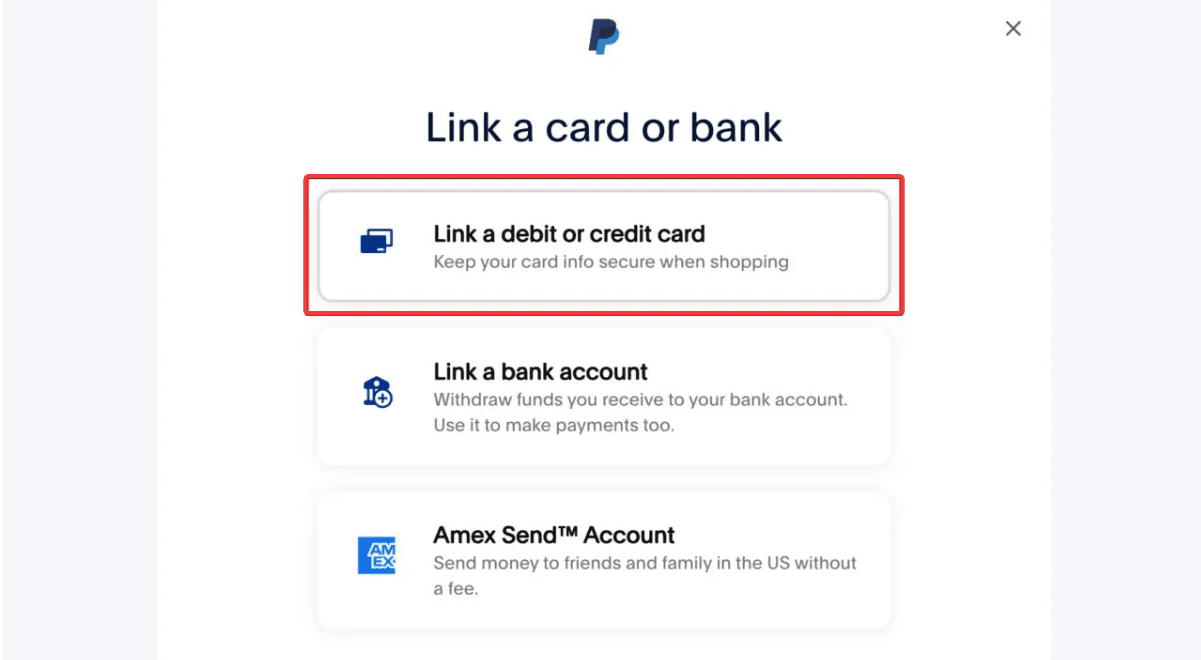
Select the option to "Link a card".
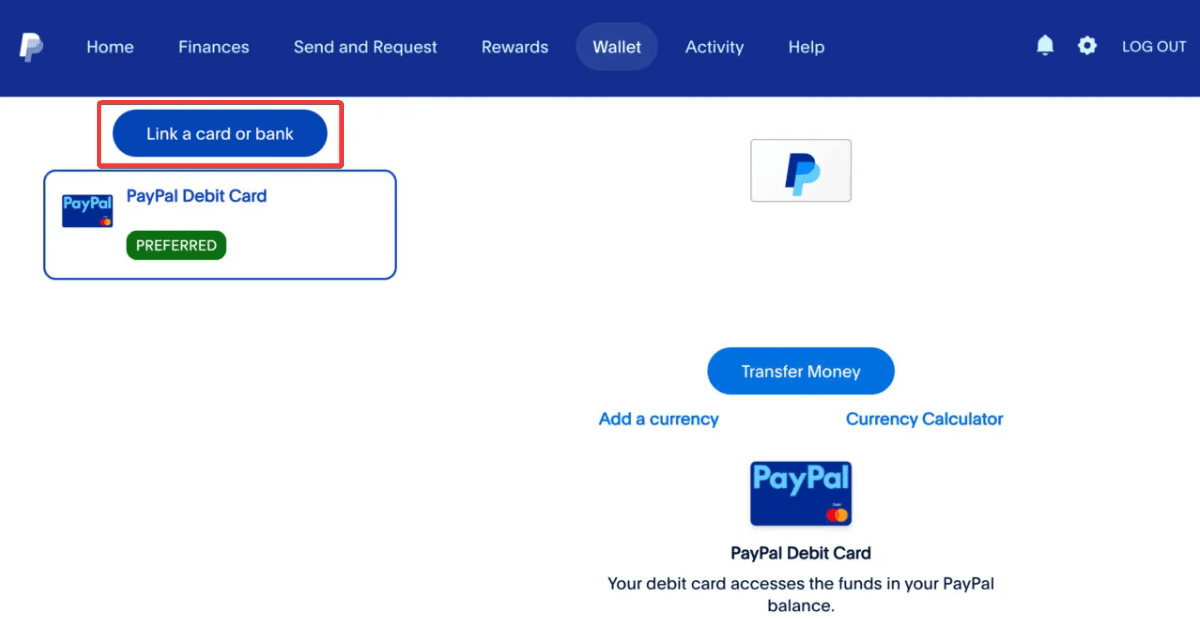
Choose "link to a debit or credit card"
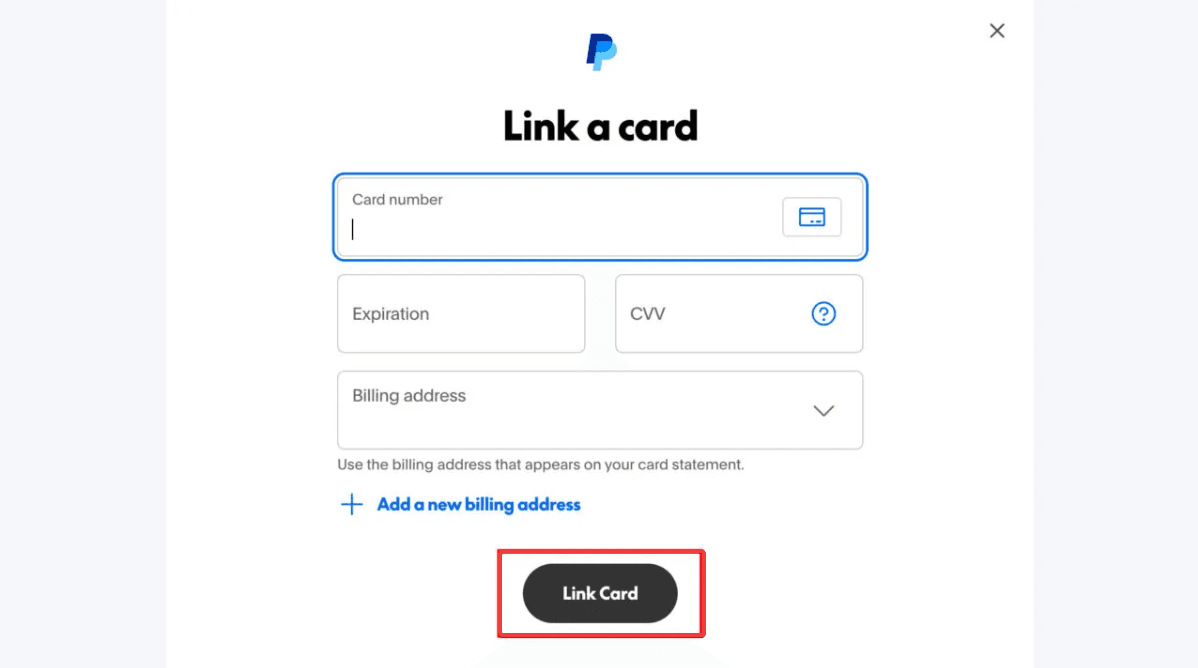
Open your Kazawallet application console, access the cards tab, and view your parameters (card number, expiration date, and CVV code). Review our guide on how to fill in the Kazawallet card billing address to ensure the process is successful.
Fill in the billing address. Review our guide on how to fill in the Kazawallet card billing address to ensure the process is successful.
Click "Link Card".
Frequently Asked Questions (FAQ)
Does the Kazawallet virtual card successfully operate inside Syria to link to PayPal?
Yes. Once your virtual card tier is generated and funded via crypto or local deposit networks, you can deploy its parameters to securely verify your PayPal profile and check out online from Syria without needing traditional local bank setups.
Can I utilize my Kazawallet card to receive and withdraw funds out of PayPal?
No. The card infrastructure is strictly engineered to verify profiles and clear online digital checkouts (Pay for PayPal with Crypto). The card core does not currently support receiving inbound merchant payouts or pulling money out of a PayPal balance into your Kazawallet application currently.
Which cryptocurrencies are supported to fund my account and load the card?
Kazawallet natively accommodates major blockchain assets, including Bitcoin, Ethereum, USDT, USDC, SOL, BNB, LTC, TRON, and Toncoin. You can deposit any of these tokens for free, exchange them into a stable USD position inside the app, and reload your card immediately.
Are there extra foreign transaction fees if I check out via PayPal in a non-USD currency?
Your virtual Visa operates as a globally recognized international payment asset. If the merchant's checkout matches US Dollars (USD), zero extra costs apply. If you purchase items billed in alternative currencies (like Euros, Turkish Lira, or British Pounds), the network handles the conversion automatically, implementing a standard foreign transaction fee (FX Fee of 2.5%).
Next Step
Unlock a seamless online shopping experience and absolute digital sovereignty without international billing roadblocks. Order your virtual now, link a PayPal account with crypto, and execute your checkouts with ease