With the rising popularity of Gram (TON), more and more users are looking for reliable ways to manage and withdraw their digital assets securely.
Kazawallet, known for its user-friendly interface and robust security features, offers an efficient way to manage your Gram.
In this guide, we’ll walk you through the step-by-step process of withdraw Gram from Kazawallet, ensuring your assets are transferred smoothly and securely.
What is Gram (TON)?

Gram (TON) is the native cryptocurrency of the Telegram Open Network (TON), a blockchain platform originally developed by the creators of Telegram, one of the world’s most popular messaging apps.
Gram was designed to integrate seamlessly with Telegram’s ecosystem, enabling in-app payments, bot transactions, and microtransactions within the app.
The broader vision behind Gram is to create a decentralized platform that supports a wide range of applications, including decentralized finance (DeFi), gaming, and social media.
The TON blockchain is known for its advanced technology, including features like dynamic sharding, a Byzantine Fault Tolerant (BFT) consensus mechanism, and the TON Virtual Machine (TVM), which together enhance scalability, security, and efficiency.
Despite facing regulatory challenges early on, Gram has gained renewed interest and adoption, especially after Telegram officially embraced it as its Web3 infrastructure in 2023.
This integration has made Gram a key player in the cryptocurrency space, particularly within the Telegram user community.
Why Choose Kazawallet for Managing Gram?
Choosing Kazawallet for managing your Gram comes with several distinct advantages that cater to both novice and experienced cryptocurrency users:
- Seamless Integration: Kazawallet provides seamless integration with Gram allowing users to store, send, and receive TON tokens efficiently. The wallet is optimized for handling TON transactions, ensuring that users can manage their assets with minimal hassle.
- Security: One of the top priorities for any cryptocurrency wallet is security, and Kazawallet excels in this area. The platform employs advanced security protocols to protect your Gram from potential threats, ensuring your assets are safe at all times.
- Low Fees: Kazawallet offers competitive fees for transactions, including withdrawals and exchanges. This makes it an economical choice for users who frequently manage their Gram.
- Multi-Currency Support: In addition to Gram Kazawallet supports a wide range of other cryptocurrencies and fiat currencies, providing users with the flexibility to manage all their digital assets in one place.
- Responsive Customer Support: Kazawallet prides itself on its customer support, offering prompt assistance to users. Whether you encounter an issue or simply have a question, the support team is available to help you resolve it quickly.
With these features, Kazawallet stands out as a reliable and efficient choice for anyone looking to manage their Gram with ease and confidence.
Withdraw Gram from Kazawallet
Withdraw Gram (TON) from Kazawallet is a straightforward process.
Here’s a step-by-step guide to help you through Withdraw Gram from Kazawallet:
- Start by logging into your Kazawallet account with your credentials.
- From the home page, go to the “Wallets” section where all your digital assets are managed.
- Once in the “Wallets” section, find and click on the “Withdraw” option.
- Choose “Gram” as the currency you want to withdraw.
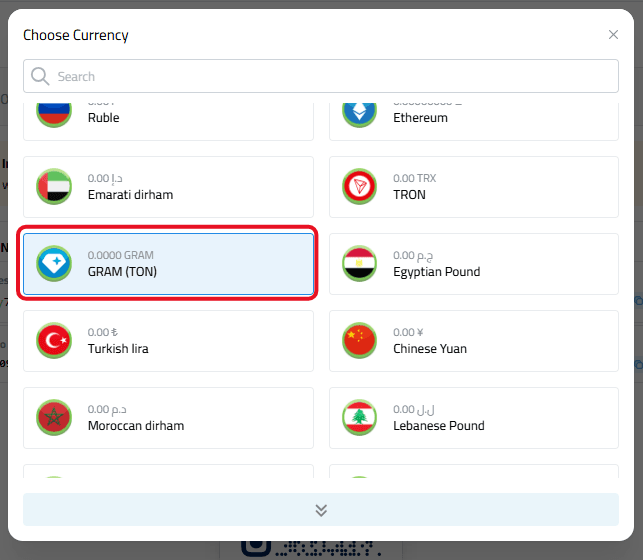
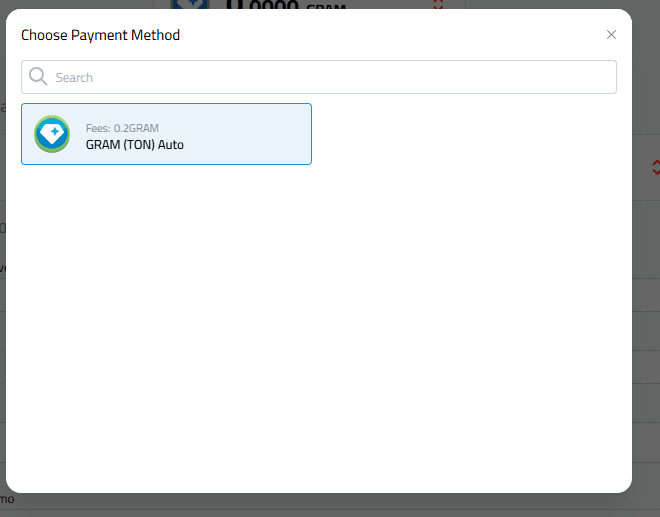
- Choose “Ton" as the payment network.
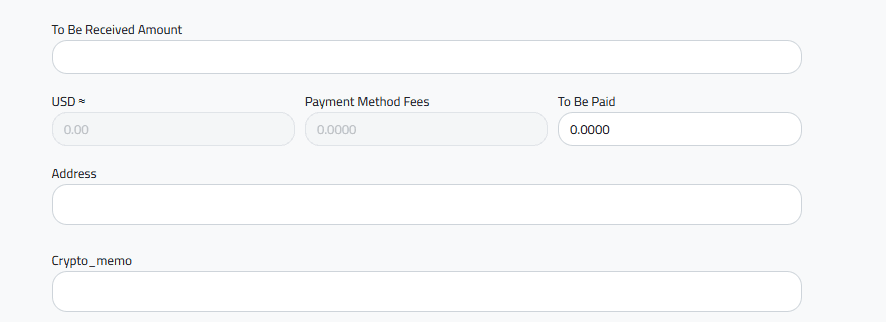
- Input the amount of Gram you wish to withdraw. Make sure the amount is correct before proceeding.
- Provide the address of your external Gram wallet where you want the funds to be transferred.
- Enter the Memo/Tag associated with your Gram wallet to ensure the funds are credited correctly.
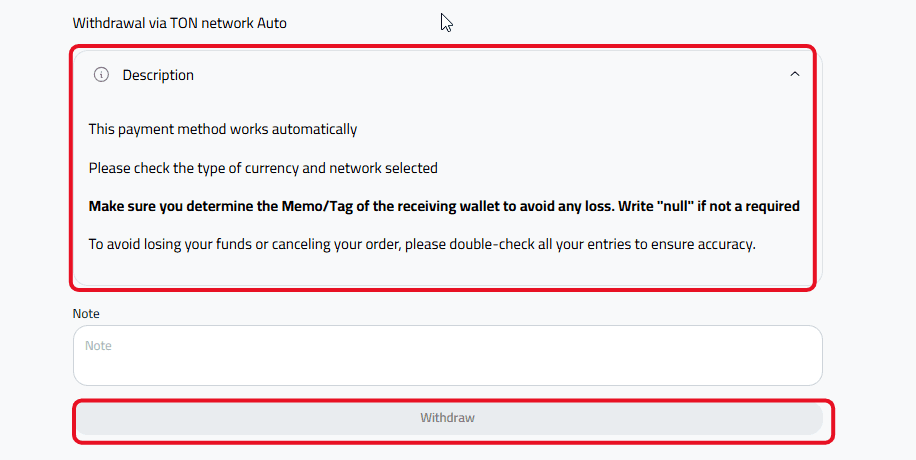
- Before finalizing the transaction, review all the details, including the amount, wallet address, and Memo/Tag, to avoid any errors.
- Once you’ve confirmed that all the details are correct, click the “Withdraw” button to Withdraw Gram.
- Confirmation and Processing: Your withdrawal request will be confirmed and processed via the TON network automatically. The process will typically be completed within a short period.
Following these steps will ensure a smooth and efficient Withdraw Gram from Kazawallet to your external wallet.
In Conclusion
Withdraw Gram (TON) from your Kazawallet account is a straightforward process, but it’s essential to take the necessary precautions to ensure the security and accuracy of your transaction.
By carefully following the steps, double-checking your wallet address, and using the correct Memo/Tag, you can confidently manage your Gram assets.
Remember, Kazawallet is designed to provide a seamless experience, offering you control and peace of mind as you handle your digital currency.
Start your withdrawal today and experience the ease and security Kazawallet brings to managing your Gram.