You can now eliminate disruptive YouTube ads and pay for YouTube Premium using crypto. Depositing crypto and exchanging it into a stable USD balance via Kazawallet grants your virtual card the capability to clear your preferred plan instantly with minimal processing fees.
You can pay for YouTube Premium subscription with crypto, utilizing the Kazawallet Visa card. This is executed by funding your account with your digital assets (such as USDT, Bitcoin, Binance, TRON, and others)
exchange them within the wallet into a dollar-backed balance (USDT, USDC, or USD), load your card, and subsequently deploy it across your app store (Google Play / App Store) or the official YouTube website to verify YouTube Premium instantly with minimal processing costs.
Whether you hold the Basic Card tier or the advanced premium Plus Card tier, both options grant you full operational capacity to clear your bills and enjoy an ad-free viewing experience.
Why choose the Kazawallet Visa Card to pay for YouTube Premium using crypto?
You require a flexible international Visa asset that accepts crypto funding to bypass local billing barriers and payment restrictions, powered by capital sourced directly from your digital currency wallet.
Kazawallet bridges this exact framework:
Exchanging Crypto Earnings into Premium Entertainment: The Kazawallet card functions as an international Visa card built for real-time crypto funding.
If you receive your freelance wages or commissions in USDT or cryptocurrencies, you can exchange this digital income directly into checkout liquidity to cover your digital subscriptions without withdrawing cash or searching for third-party brokers.Save Money with Family or Annual Plans: Thanks to the card's flexible limits, you can easily pay for YouTube's annual plan in a single transaction (saving a portion of the long-term cost) or activate a family tier to share with friends, bypassing traditional monthly recurring billing hassles.
Low Fees and Total Operational Transparency: Card loading fees are minimal and fixed (1.5%), paired with substantial daily transactional caps that cover all your technical and streaming subscriptions without complex math.
Complete Asset Oversight and Safeguards: You can instantly freeze your card profile via the app dashboard right after activation to block unwanted merchant renewals.
Your card is fully protected by the 3D Secure framework, dispatching an immediate OTP to your registered email to validate transactions and eliminate fraud.
You can read the full guide on Kazawallet card features, fees, and limits
Baseline Operational Pre-requisites
To pay for YouTube Premium using crypto, the process passes cleanly on the first attempt, verifying the readiness of the following:
- A verified Kazawallet account: To use deposit and card services, your account must be fully verified (KYC).
- Digital currency balance: Whether this balance is already in your Kazawallet (like BTC, ETH, SOL…), or you have digital currencies in an external wallet that you will deposit now.
- Kazawallet card: The card must be ready to use. If you don’t have one, follow the guide on how to issue a Kazawallet card.
Active Google / YouTube Account: The target account you wish to upgrade to the premium tier.
What are the Steps to pay for YouTube Premium using crypto?
The payment and activation flow condenses into a clear, two-phase setup: funding your card with crypto, then finalizing the billing process inside the YouTube console or your mobile app store.
Phase 1: Setting Up Your Card Profile and Loading Crypto Balances
During this phase, you will transform the cryptocurrency you hold and wish to spend into a flexible dollar balance (USD/USDT/USDC) optimized for loading:
- Deposit: Deposit the crypto you own (USDC, LTC, BNB, TRON, BTC, ETH, SOL, USDT, Toncoin) into your Kazawallet account. (Read How to Deposit Crypto into Kazawallet)
- Exchange: Go to the “exchange” section and exchange this crypto into a (USDT, USDC, or USD) balance.
- Top-up your Card: Top up your Kazawallet card with the balance you got from the previous conversion.
If you do not have an active card layout, please follow our comprehensive manual: How to Issue and Load Your Kazawallet Card. By following this workflow, your card is successfully funded with your crypto reserves and fully prepared for checkout.
Phase 2: Activating Your YouTube Premium Subscription
- Open the YouTube app or navigate to the official YouTube website.
- Click on your profile picture.
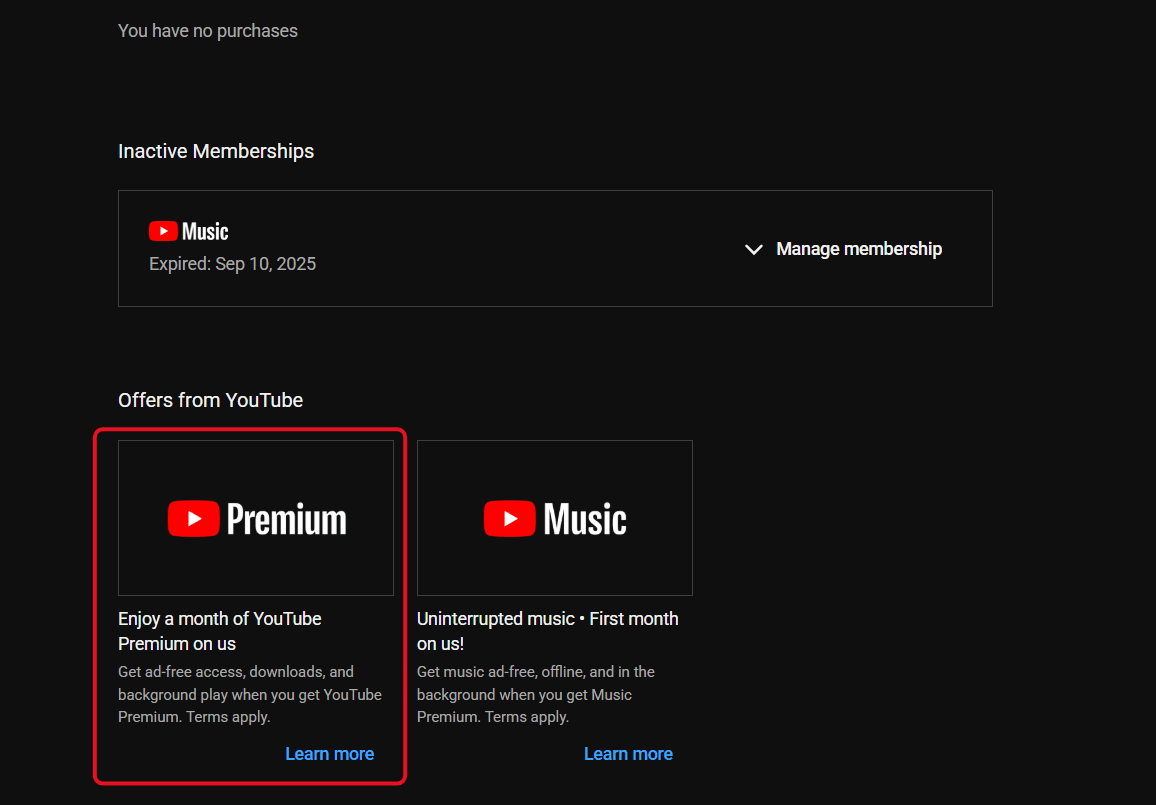
- Select Purchases and memberships.
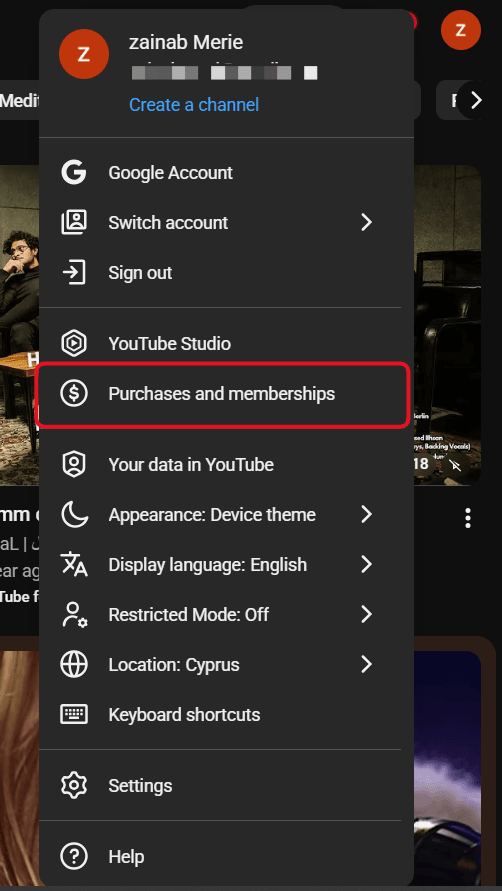
- Tap your Premium membership, then click Learn more next to your current payment method.
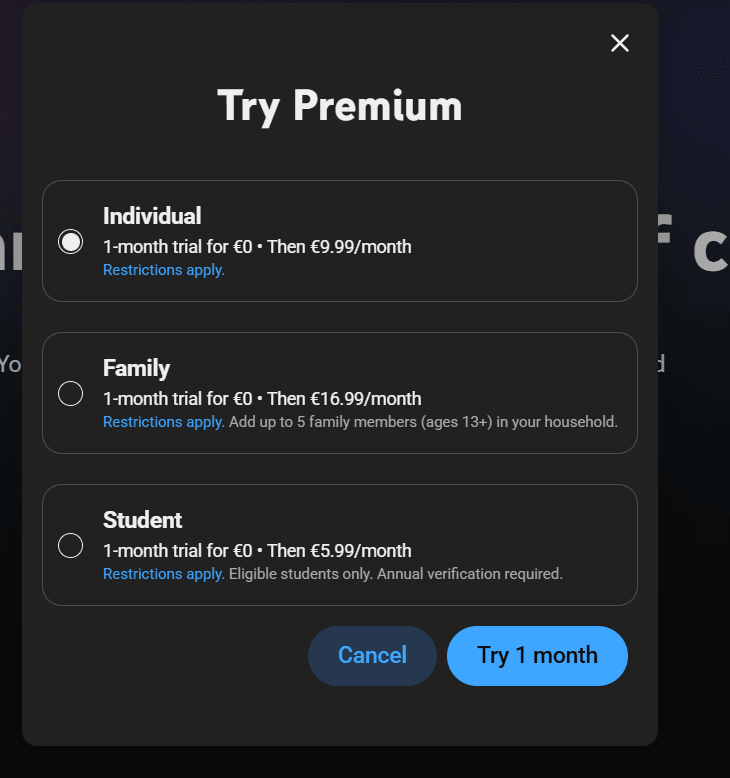
- Choose the plan layout that suits you.
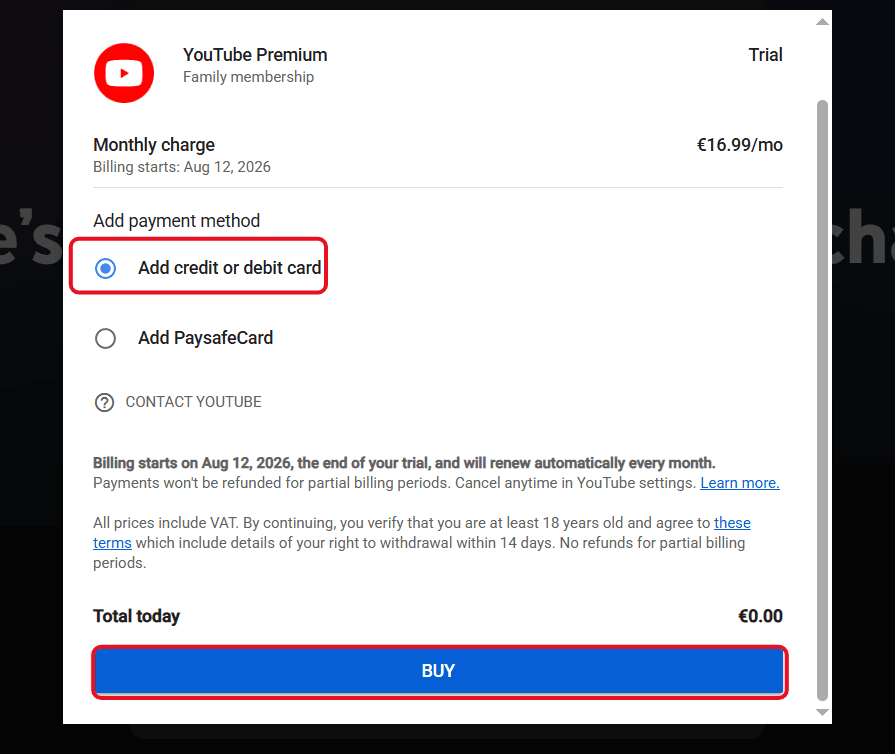
- Click the arrow to select an alternative payment method, or choose Add credit or debit card.
Open your Kazawallet application console, access the cards tab, and view your parameters (card number, expiration date, and CVV code). (For extra details, read: How to View Kazawallet Card Details).
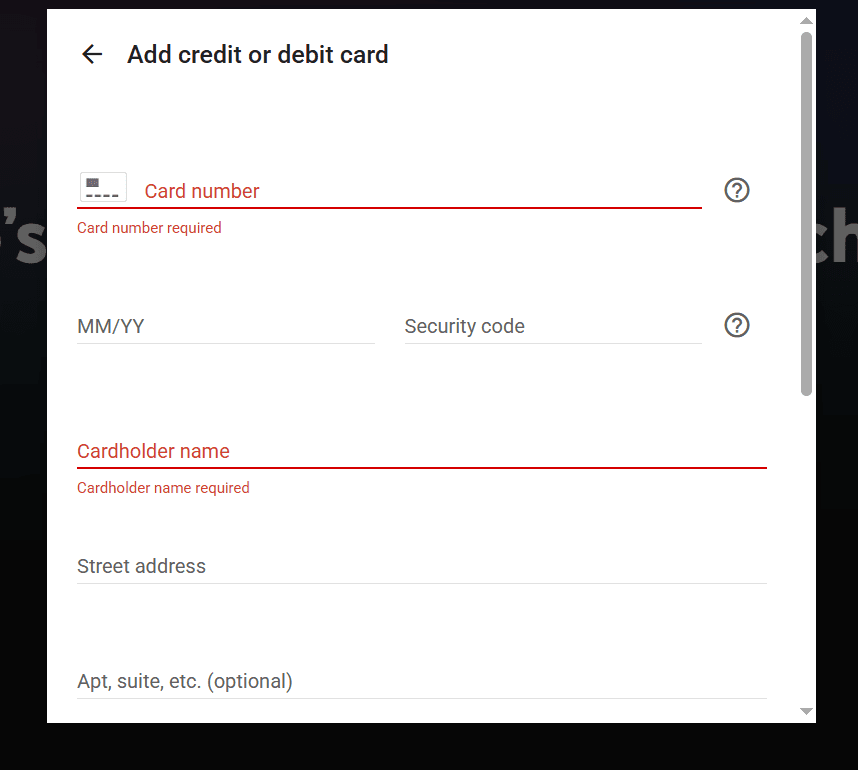
Populate the card input boxes, ensuring you copy your billing address details accurately.
(Review our standard guide on how to fill out the billing address for a Kazawallet card to ensure zero transaction errors)
Frequently Asked Questions (FAQ)
Does the Kazawallet virtual card work in Syria to activate YouTube Premium?
Yes. Once your virtual card tier is generated and funded via crypto or local deposit networks, you can deploy its parameters to securely activate your YouTube Premium account directly from Syria, enjoying an ad-free experience without traditional local bank setups.
Which cryptocurrencies are supported to load my Kazawallet card?
Kazawallet natively accommodates major blockchain assets, including Bitcoin, Ethereum, USDT, USDC, SOL, BNB, LTC, TRON, and Toncoin. You can deposit any of these tokens for free, exchange them into a stable USD position inside the app, and reload your card immediately.
Can I link the virtual card to Google Wallet to process the payment?
Yes, absolutely. Kazawallet virtual cards link seamlessly with mobile wallet frameworks; you can easily add your card to Google Pay and use it to manage and fund your app store checkouts easily.
Can I link the virtual card to Apple Wallet to process the payment?
Yes, absolutely. Kazawallet virtual cards link seamlessly with smart mobile wallet ecosystems; you can easily link your card to Apple Pay and deploy it to manage and clear your app store checkouts smoothly.
Are there extra foreign transaction fees if my YouTube subscription bills in a non-USD currency?
Your virtual Visa operates as a globally recognized international payment asset. If your YouTube profile resides in a region billed in US Dollars (USD), zero extra costs apply.
If your account is mapped to an alternative currency (like Euros or Turkish Lira), the system automatically exchanges and applies a standard foreign transaction fee (FX Fee of 2.5%).
Next Step
Enjoy premium YouTube features and background audio playback right away without billing bottlenecks. Order your Kazawallet Visa card now, top it up with crypto, and activate your subscription seamlessly and with total ease.