
You can pay for Telegram premium subscription with Crypto by utilizing the Kazawallet Virtual Visa Card.
This is done by funding your account with crypto (such as USDT, Bitcoin, BNB, TRON, etc.), converting it within the wallet into a spendable balance (USDT, USDC, or USD), and topping up your card. You can then use the card details in your app store or via the official Telegram bot to activate Telegram Premium instantly with the lowest commission.
Whether you own the Basic Card or the Plus Card, both tiers grant you the full capability to settle your payment.
Why choose Kazawallet Visa to pay for Telegram premium subscription with Crypto?
You need a Visa card that accepts crypto funding directly from your digital wallet. Kazawallet bridges these two worlds:
- Liquidate Digital Earnings: If you get paid in USDT or other cryptocurrencies, you can convert this digital income directly into a payment currency without needing to withdraw cash or find a middleman.
- Save Money (Annual Plan): Thanks to higher card limits, you can pay for a full year at once (saving about 20%) instead of intermittent monthly payments.
- Reasonable Limits: Fees are low and transparent (1.5% for top-ups), and daily limits are high (ranging from $10 to $200,000), covering any cost.
- Full Control: You can instantly freeze the card after completing your purchase to ensure no unwanted subscriptions are charged, and reactivate it whenever you want.
- Extra Protection: The card is protected by 3D Secure, meaning an OTP code will be sent to your registered email to confirm the transaction and prevent fraud.
You can read the full guide on Kazawallet card features, fees, and limits
Requirements Before Starting
To pay for Telegram Premium subscription, make sure the following are ready:
- A verified Kazawallet account: To use deposit and card services, your account must be fully verified (KYC).
- Crypto balance: Whether this balance is already in your Kazawallet (like BTC, ETH, SOL…), or you have crypto in an external wallet that you will deposit now for free.
- Kazawallet card: The virtual card must be issued. (If you don’t have one, follow the guide on how to issue a Kazawallet card.)
- Telegram Account.
Steps to pay for Telegram Premium subscription with Crypto
The process consists of a simple 3-step cycle: Deposit crypto, convert it, and pay with the card.
Phase 1: Preparing and Funding the Kazawallet Card
- Deposit: Deposit the crypto you own (USDC, LTC, BNB, TRON, BTC, ETH, SOL, USDT, Toncoin) into your Kazawallet account. (Read How to Deposit Crypto into Kazawallet)
- Exchange: Go to the “exchange” section and exchange this crypto into a (USDT, USDC, or USD) balance.
- Top-up the Card: Top up your Kazawallet card with the balance you got from the previous conversion.
Phase 2: Activating the Telegram Subscription
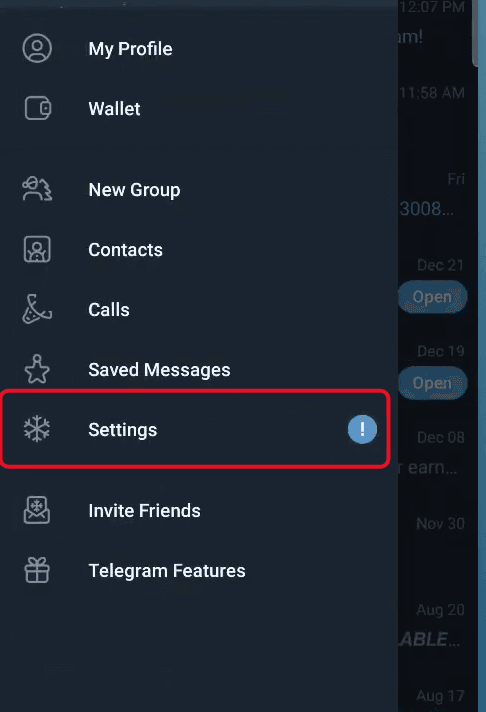
- Open the Telegram app and navigate to "Settings".
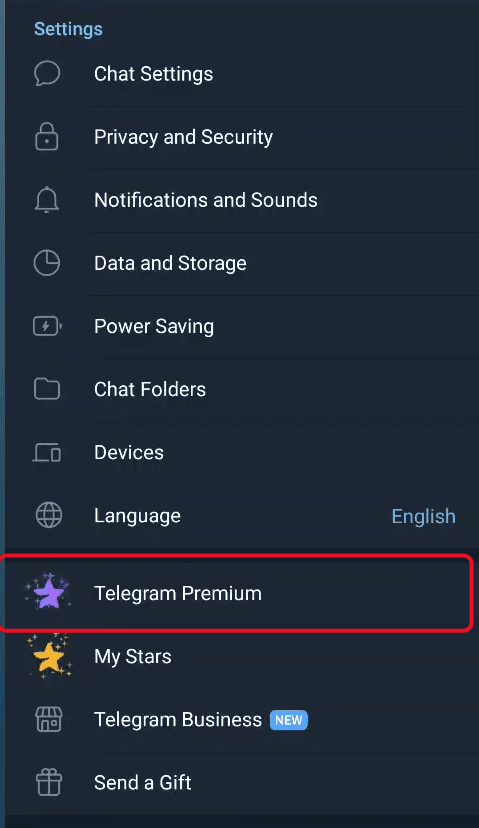
- Tap on "Telegram Premium".
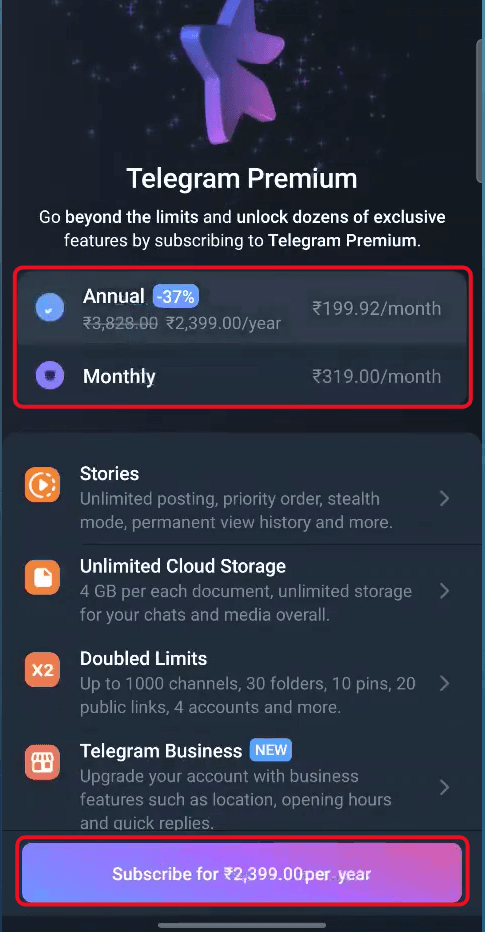
- The subscription page will open. Choose your preferred Annual or Monthly subscription plan, then tap the Subscribe button.
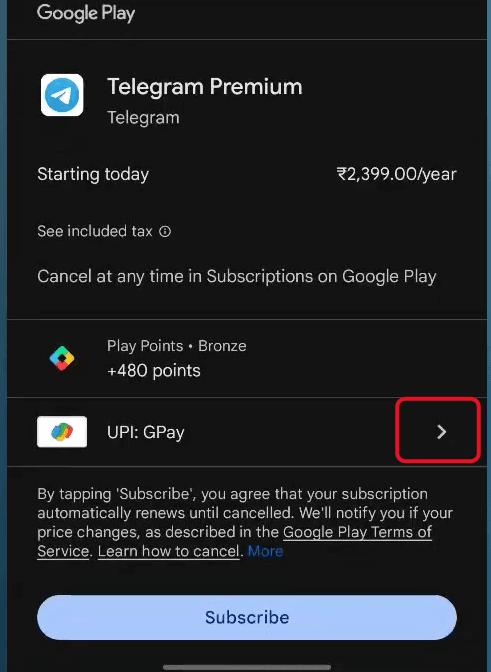
- The Google Play payment window will appear. Tap the arrow next to the current payment method.
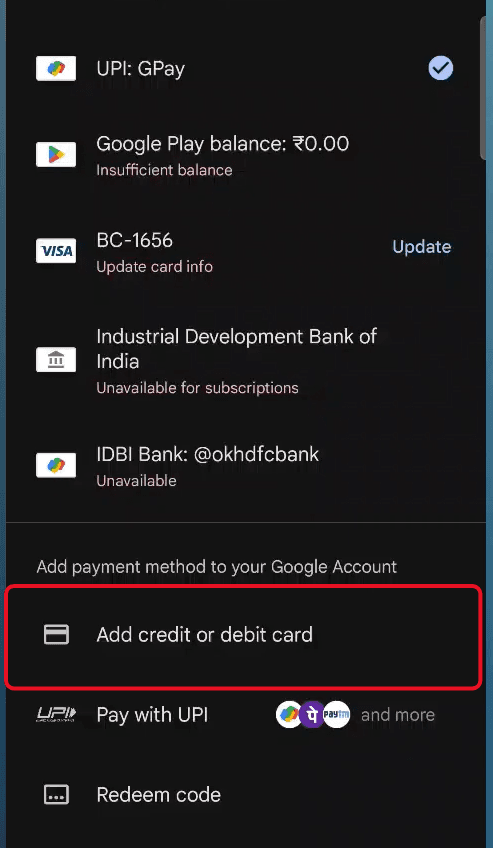
- From the list of available payment methods, select "Add credit or debit card" to complete the payment process.
- Open your Kazawallet app and copy your card parameters (number, expiration date, and CVV). (For more details, read our guide: How to View Kazawallet Card Details).
- Fill in the billing address. Review our guide on how to fill in the Kazawallet card billing address to ensure the process is successful.
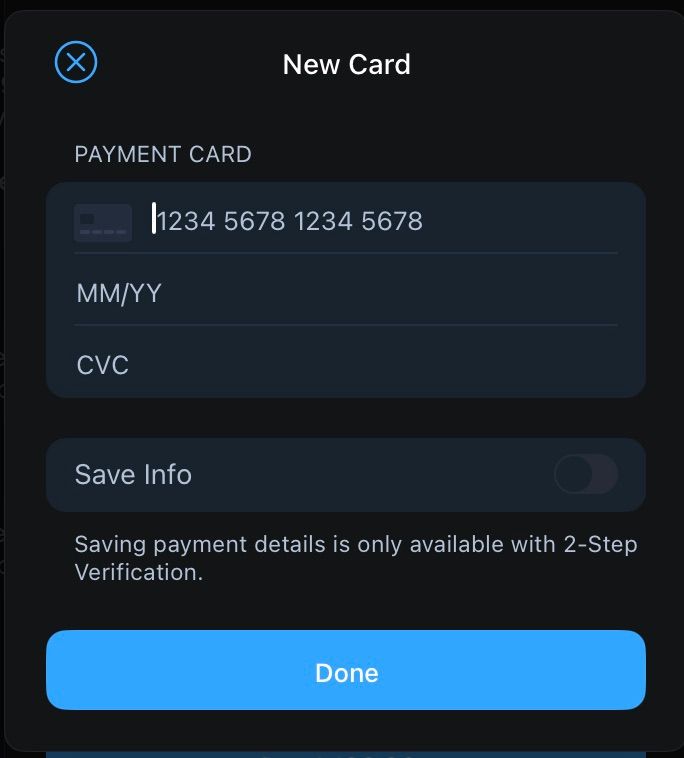
- Confirm the transaction.
Frequently Asked Questions (FAQ)
Does the Kazawallet card work in Syria to activate Telegram Premium?
Yes. Once the card is issued and funded with crypto, you can use it to activate the subscription from within Syria without needing a traditional bank account.
What is the best currency to fund the card and pay for the subscription?
It is recommended to use Tether (USDT) to ensure value stability and fast processing.
Which cryptocurrencies are supported for depositing and funding the card?
Kazawallet supports many major coins such as Bitcoin, Ethereum, USDT, USDC, SOL, BNB, and LTC. You can deposit any of them, convert to a balance (USD/USDT/USDC), and top up the card.
Can I use the Kazawallet card to buy in a different currency (e.g., TRY, AED, RUB, EUR)?
Yes. The card is a global Visa. You deposit in USDT, USDC, or USD and can pay in any currency. However, note that a Foreign Exchange Fee (FX Fee of 2.5%) will apply if the payment is in a currency other than USD.
What is the Next Step?
Enjoy Telegram’s elite features now without financial barriers. Order your Kazawallet Virtual Visa now and start activating your subscription with crypto immediately!