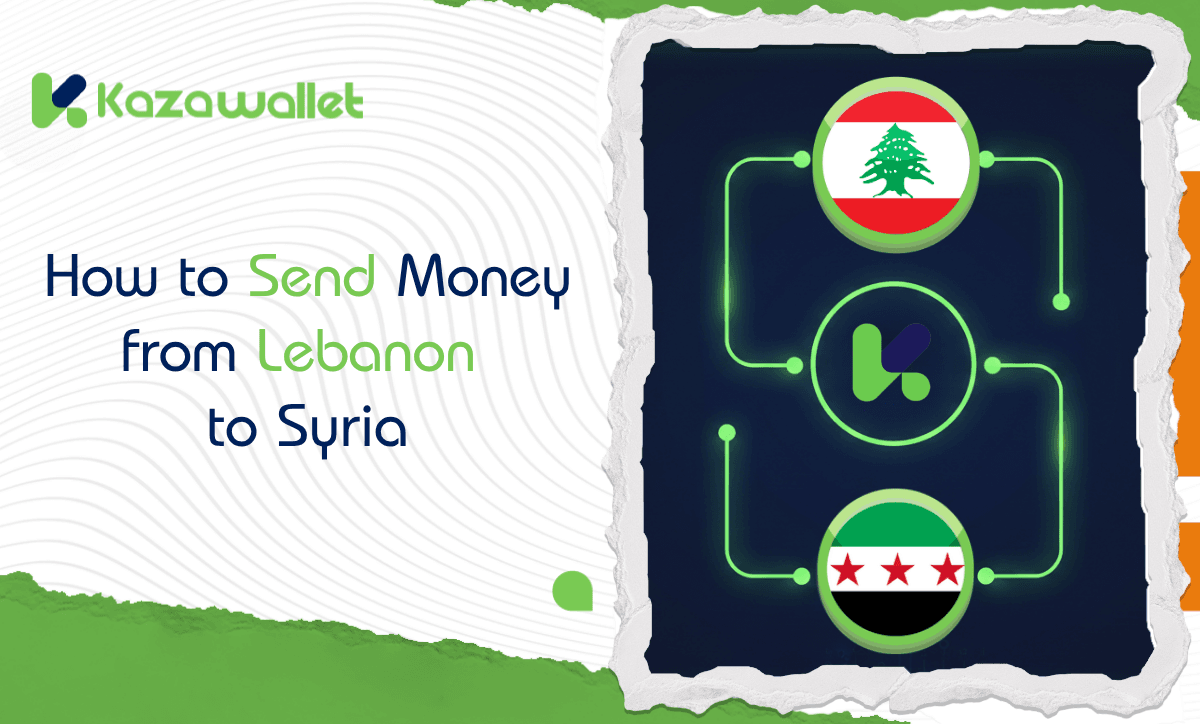
You can send money from Lebanon to Syria easily and quickly by depositing US Dollars (USD) or Lebanese Pounds (LBP) into Kazawallet via Whish Money.
Funds can then be exchanged into Syrian Pounds (SYP) or USD and withdrawn as cash in Syria within 10 minutes through agents, or within one business day via Al-Haram or Al-Fouad companies.
Cash-out Schedule and Options in Syria
| Pickup Method | Processing Time | Working Hours | Notes |
| Authorized Agents | Instant Notification (10 mins) | 11:00 AM – 04:00 PM | Hand-to-hand USD delivery (1% fee, min $2) |
| Al-Ittihad & Doviz | Instant (Within working hours) | 11:00 AM – 05:00 PM | USD Cash delivery from branches |
| Al-Haram Company | Within 1 business day | Company hours | Standard withdrawal fees apply |
| Sham Cash Wallet | 3 to 6 hours | 11:00 AM – Midnight | Digital transfer between wallets |
Kazawallet vs. Western Union & Traditional Methods
| Feature | Kazawallet | Western Union | Traditional Methods |
| Exchange Rate | Closest to real market rate (Best for recipient) | Bank rate (Often much lower than market) | Unstable and risky |
| Pickup Type | SYP, USD, Hand delivery, Bank deposit | Mostly SYP Cash | Mostly SYP |
| Speed | Instant notification within minutes | Minutes (Subject to conditions) | Hours to days |
| Coverage | Rural, cities, and remote areas | Specific centers only | Geographically limited |
Fee Illustration (Full Transparency)
To ensure you know every detail before transferring, here is how fees are calculated:
- Withdrawal via Agent: Hand-to-hand USD cash delivery with a fee of (1%, min $2). For example, if you withdraw $100, the fee will be only $2, and the recipient receives it within minutes with an instant notification.
- Al-Ittihad & Doviz: Cash USD or SYP delivery with a fee of (1.5% + $1). For example, if you withdraw $200, the fee will be $4 ($3 for the 1.5% + $1 fixed fee), and USD cash is delivered directly from branches.
- Withdrawal via Al-Haram/Al-Fouad: If you wish to receive the amount in SYP, exchange company fees start from 11,000 SYP and increase gradually based on the transfer amount.
Comprehensive Coverage: Areas and Cities in Syria
Kazawallet features a vast pickup network covering all Syrian geography, ensuring your transfer reaches any point the recipient is looking for:
- Damascus & Surroundings: (Old Damascus, Mazzeh, Jaramana, Sahnaya, Qudsaya, Al-Tall, Yabroud, Al-Nabk).
- Northern Region: (Aleppo, Idlib, Afrin, Al-Bab, Azaz, Manbij, Jarabulus).
- Central & Coastal Region: (Homs, Hama, Latakia, Jableh, Tartous, Baniyas, Masyaf, Salamiyah).
- Southern Region: (Daraa, Sweida, Quneitra).
- Eastern & Northeastern Region: (Qamishli, Hasakah, Raqqa, Deir ez-Zur, Mayadin, Al-Bukamal).
How to Transfer Money from Lebanon to Syria
You can transfer money from Lebanon to Syria using Lebanese Lira or US Dollars via Kathawallet, which involves three main steps:
1. Deposit US Dollars (USD) into Kathawallet via:
The remittance process involves three main stages:
- Whish Money: You can get complete details by reviewing the detailed article.
Payeer: You can get complete details by watching a video of the process.
For more USD deposit methods, read the following detailed article on how to deposit USD into Kathawallet.
Alternatively, you can deposit Lebanese Lira (LBP) via Wish Money: You can get complete details by reviewing the detailed article. - Process: Copy the unique “Deposit Address,” send the amount from the nearest Whish Money center, and upload a screenshot as proof of the transaction.
2. How to exchang USD/LBP to Syrian Pounds (SYP)
- Go to the “Wallet” section and click on “Currency Exchange.”
- Select the source currency (USD or LBP) and choose Syrian Pound (SYP) as the target.
- Enter the amount and click “Exchange” to finish instantly.
3. Withdrawing Funds in Syria
- Click “Withdraw” and select the currency and company (e.g., Al-Haram or Al-Ittihad).
- Enter the recipient’s details (Full name and phone number).
- For Instant Pickup: Choose Authorized Agents (1% fee, min. $2) or Al-Ittihad/Dovez.
- For Formal Pickup: Choose Al-Haram or Al-Fouad (delivery within one business day).
Depositing US Dollars to Kazawallet
Important note: Before depositing, check if the deposit method you have chosen requires a verified account.
If your account is not yet verified, you can review our guide on how to verify your account and learn about the difference between verified and limited accounts.
- Log on to your Kazawallet account using your login credentials, and if you don’t have an account, first create a new one on the website.
- Sign in and you will be directed to your homepage on Kazawallet. You need to look for the section called “Wallet“.
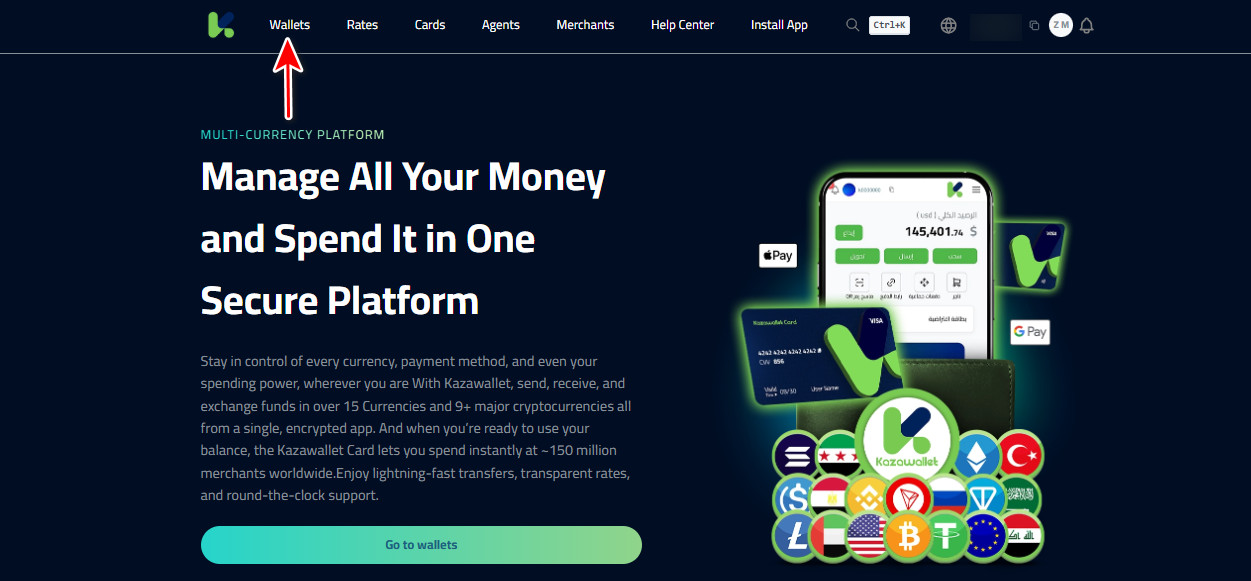
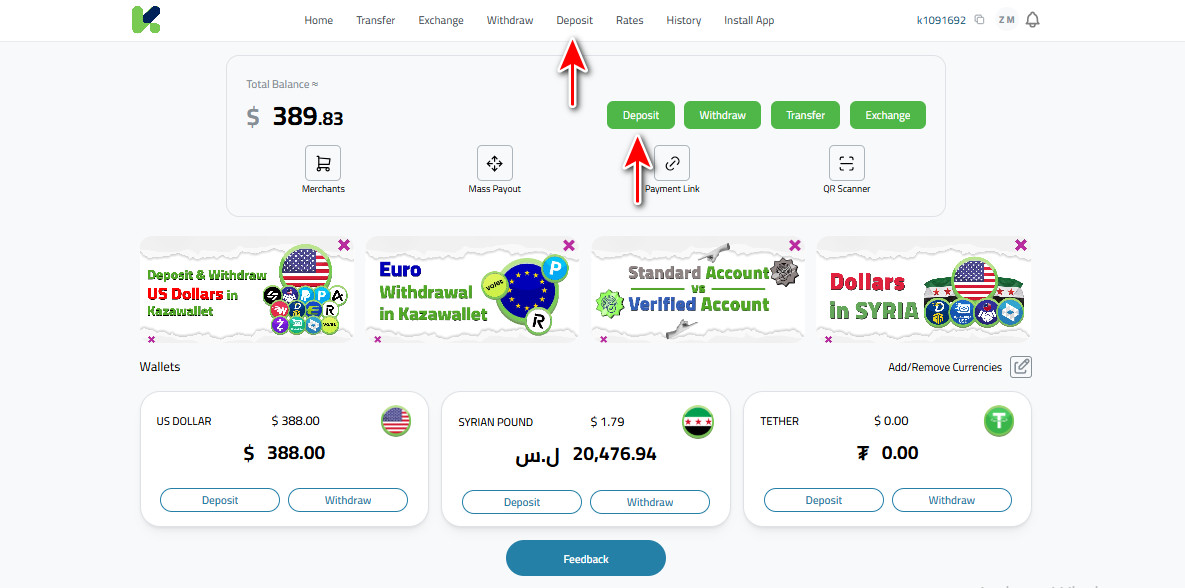
- In the Wallet section, click on the “Deposit” option to initiate the process.
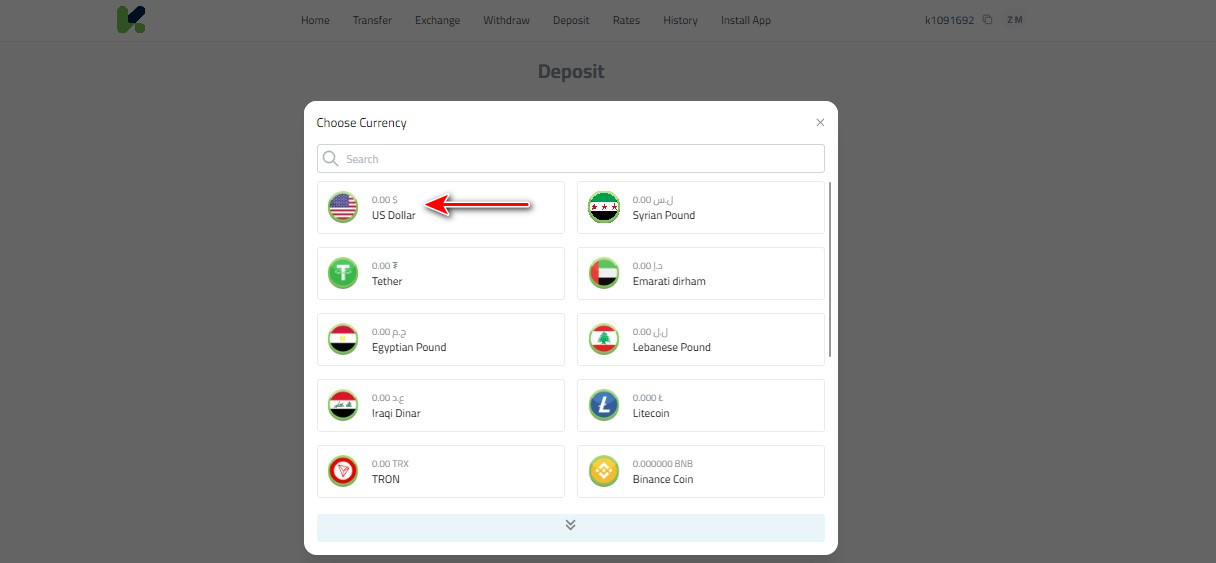
- You will be presented with a list of currencies available for deposit; thereby, select “US Dollar” from the list, as the currency you intend to deposit into your Kazawallet account.
- After selecting the currency, further select the preferred payment method for the deposit
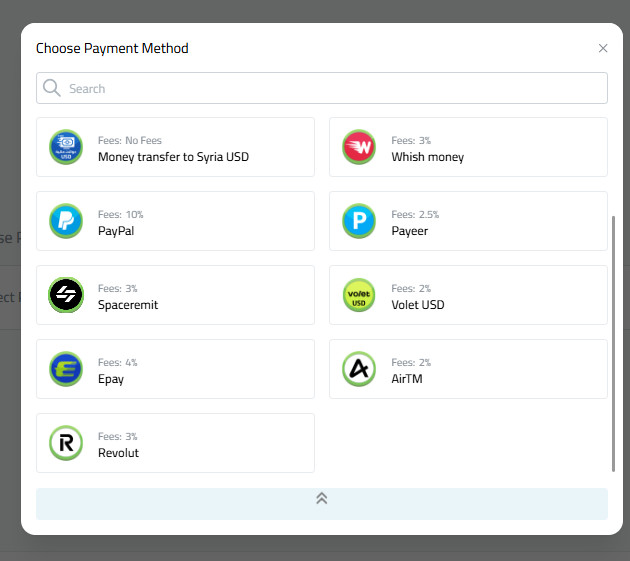
- Enter the amount in USD that you want to deposit into Kazawallet, making sure the correct amount you intend is entered.
- Once the amount is input, the “Deposit Address” will appear on the screen. This address is unique for every transaction, and the transfer requires it. Copy this address.
- Now, using your preferred method of sending, go ahead and send the selected amount to the copied deposit address.
- After the transfer, take a screenshot for your records.
- Go to the Kazawallet website and upload the screenshot that you have captured in step 9. Click “Deposit“.
For more details: All USD deposit methods are covered in the following comprehensive article: Depositing USD into Kathawallet: A Guide to All Available Methods
Exchange US Dollars to Syrian Pounds using Kazawallet
- Once signed in, the Kazawallet home page will be shown. Find the “Wallet” section.
- Click on the “Exchange” option.
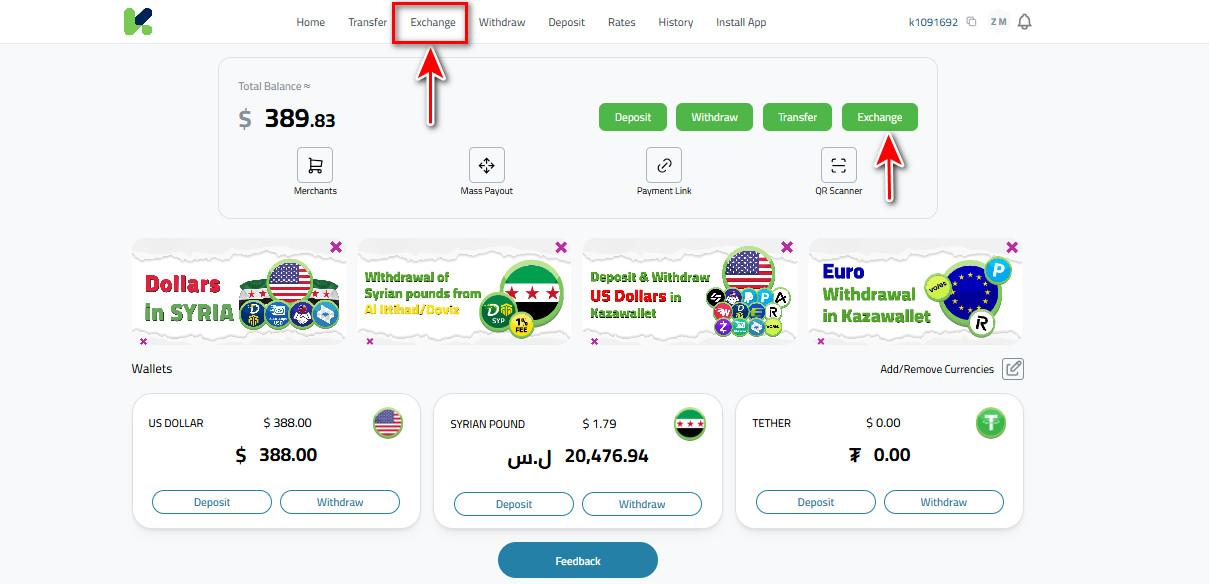
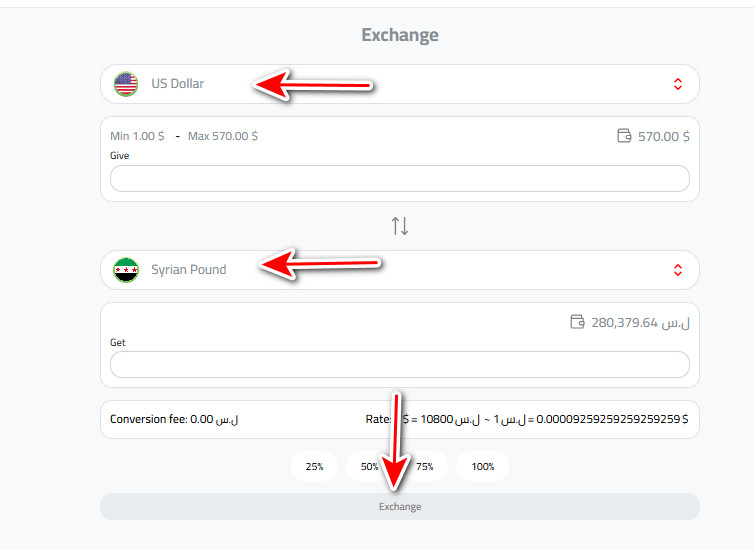
- On the currency exchange page, select “US Dollar” from the list to choose the desired currency in which the sum should be exchanged.
- Choose “Syrian Pound” as the currency you’d like to receive.
- Fill in the amount of USD that you want to exchange for Syrian pounds in the given field.
- After having paid attention to all the details, like the amount to be exchanged and the selection of the currencies, click on “Exchange” to finalize the exchange.
Kazawallet withdrawals in Syrian Pounds
- In the Wallet section, click “Withdraw”.
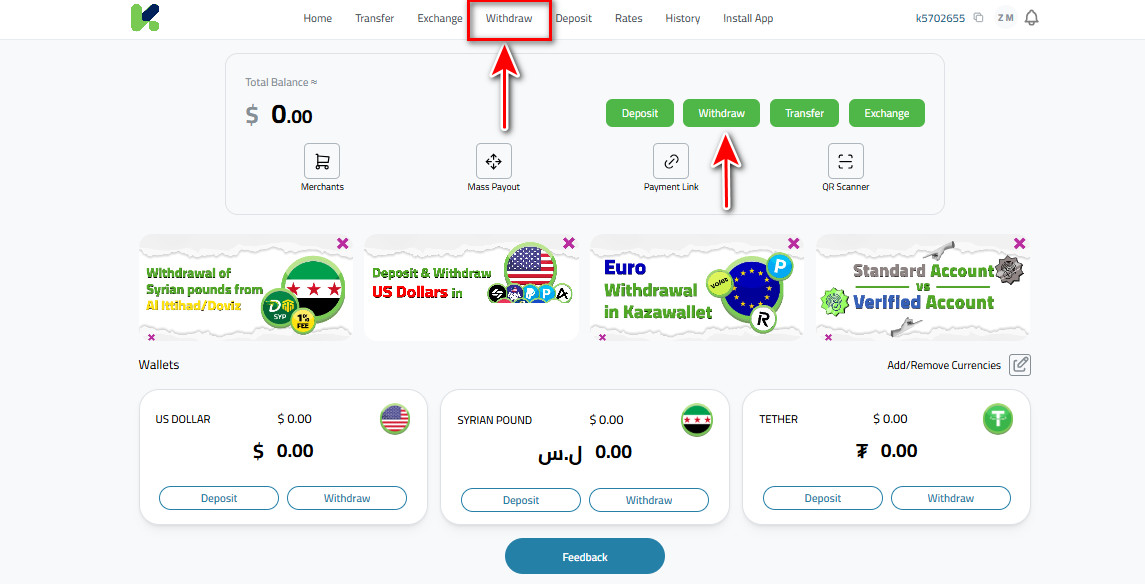
- On the withdrawal request page, make sure “Syrian Pound” is selected from the list.

- Immediately after selecting the currency, a list of available payment methods for cash-outs in Syrian pounds will appear. Look closely and choose the suitable option among them.
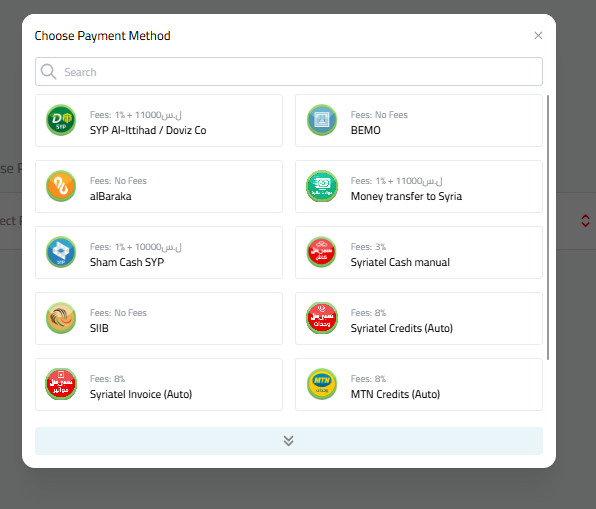
- You will be asked to fill in some details like the recipient’s account information or any other field that may be required.
- Once all information has been filled in, please check the currency selected, amount of withdrawal, means of payment, and details about the recipient before clicking the “Withdraw” button.
Frequently Asked Questions (FAQ)
Are there hidden delivery fees upon pickup in Syria?
There are no delivery fees from Kazawallet; commissions are clear in the app. Upon withdrawal, exchange companies charge their known fees, or agents charge a 1% fee (minimum $2).
Can I transfer Lebanese Pounds directly?
Yes, the platform allows you to deposit LBP via Whish Money and exchange it instantly into Syrian Pounds, saving you the trouble of manual currency exchange.
How long does a remittance from Beirut take to become cash in Syria?
Pickup via agents and Al-Ittihad is instant (within minutes), while transfers via Al-Haram or Al-Fouad take one business day.
Final Conclusion
Kazawallet gives you the power to transfer your funds from Lebanon to Syria with the click of a button, ensuring they arrive as cash through exchange networks or authorized agents in record time.
Our support team is always ready to assist you in case you face any issues.