
Today, developers and project owners fundamentally rely on advanced artificial intelligence tools to reduce work time and elevate production quality. However, local payment restrictions often stand as a barrier to fully utilizing them.
You can manage central AI tool subscriptions (like ChatGPT, Claude, and DeepL) and pay for AI tool subscriptions with crypto easily using the Kazawallet virtual Visa card.
This is done by exchanging your crypto balance into dollars and funding the card, allowing you to bypass billing blocks and ensure your favorite tools continue running without interruption.
Your Comprehensive Guide to the Top AI Tools and How to Subscribe to Them
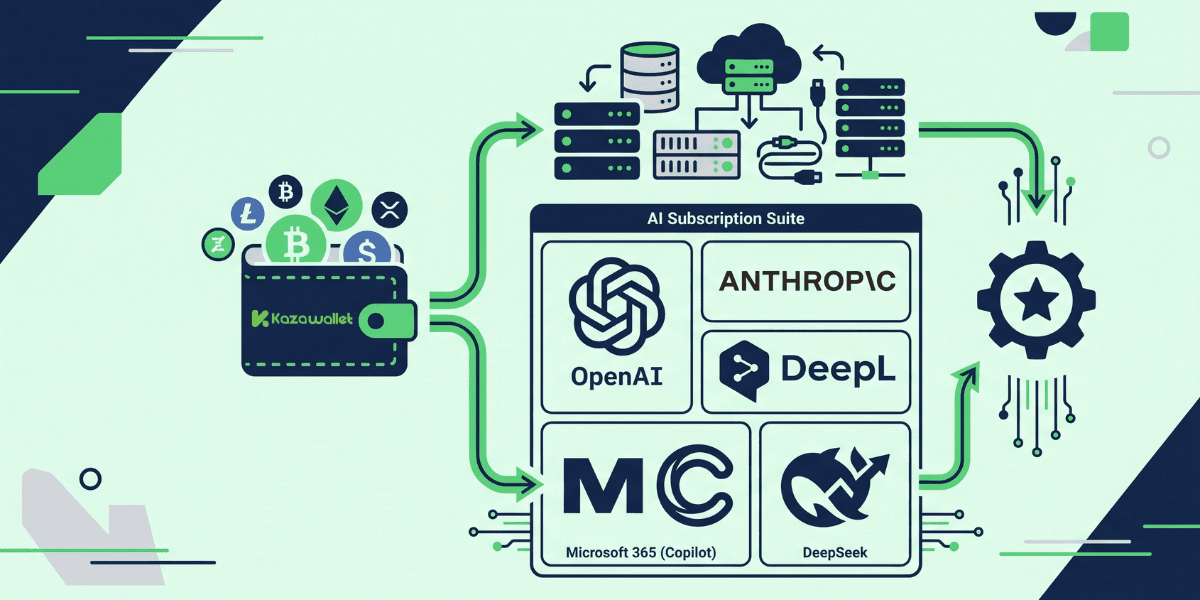
To build a professional workspace, developers and professionals need an integrated suite of tools.
Here are the most prominent platforms, along with step-by-step detailed guides on how to pay for their subscriptions using your digital wallet:
1. ChatGPT (by OpenAI): The ultimate assistant for writing code, debugging, and generating ideas. To access advanced models and unlimited features, you need the Plus plan.
🔗 Read our detailed guide: How to pay for a ChatGPT subscription using your crypto balance?
2. Claude AI (by Anthropic): The preferred choice for developers when dealing with very long documents or complex code, thanks to its massive Context Window and high capacity for logical analysis.
🔗 Discover the method here: How to pay for a Claude AI subscription using your crypto balance?
3. DeepL Pro Professional Translator: An indispensable tool for translating technical documents and SEO articles with high human-like accuracy, while maintaining original file formatting and protecting your data privacy.
🔗 Follow the steps at this link: How to pay for a DeepL Pro subscription using your crypto balance
4. Microsoft 365 Suite (with Copilot features): To manage your daily tasks effectively, this suite provides cloud-based Office applications integrated with AI capabilities (Copilot) to speed up report writing and Excel data analysis.
🔗 Check the details: How to subscribe to Microsoft 365 and activate Office apps using crypto?
5. Advanced DeepSeek Models: One of the most powerful emerging models that revolutionized programming and mathematical analysis at competitive prices. Whether you subscribe to their direct services or pay API usage bills to integrate the model into your applications, your Visa card is the fastest way to ensure continuous service.
🔗 Check the details: How to subscribe to DeepSeek using crypto?
Why Choose Kazawallet Visa to pay for AI tool subscriptions with crypto?
You need a centralized and reliable payment method to pay for AI tool subscriptions with crypto without sudden stops that disrupt your work. The Kazawallet platform gives you this complete control through the following advantages:
Bypassing Geographical Billing Restrictions: The Kazawallet card is a global Visa card accepted on US and European websites (such as OpenAI and Anthropic) that might reject cards issued from certain countries.
Managing Subscriptions from One Place: Instead of scattering your funds, you can fund a single card with your crypto balance and allocate it to pay for all your AI and software subscriptions simultaneously.
Transparent and Low Fees: A simple and clear commission (only 1.5%) is deducted solely when topping up the card balance, saving you from surprises and hidden fees imposed by traditional banks.
Absolute Security and Control: You can freeze or stop the card with a click of a button from the app if you want to halt the auto-renewal of any tool (like pausing a Claude subscription temporarily). Additionally, your payments are protected by the 3D Secure system.
You can read the full guide on Kazawallet card features, fees, and limits
Prerequisites Before Getting Started
To ensure a successful payment process on the first try without errors, make sure the following are ready:
A verified Kazawallet account: To use deposit and card services, your account must be fully verified (KYC). - Digital currency balance: Whether this balance is already in your Kazawallet (like BTC, ETH, SOL…), or you have digital currencies in an external wallet that you will deposit now.
- Kazawallet card: The card must be ready to use. If you don’t have one, follow the guide on how to issue a Kazawallet card.
- Registered Account: Your free account is ready for an upgrade on the AI platform of your choice.
What Are the Steps to pay for AI tool subscriptions with crypto?
The payment process relies on a unified and simple methodology consisting of two main phases that apply to any tool you choose:
Phase 1: Preparing and Funding the Card with Crypto
Here, you will convert your volatile cryptocurrency earnings into a stable balance ready for payment.
- Deposit: Deposit the crypto you own (USDC, LTC, BNB, TRON, BTC, ETH, SOL, USDT, Toncoin) into your Kazawallet account. (Read How to Deposit Crypto into Kazawallet)
- Exchange: Go to the “exchange” section and exchange this crypto into a (USDT, USDC, or USD) balance.
- Top up your Card: Top up your Kazawallet card with the balance you got from the previous conversion.
Phase 2: Completing the Payment on the Tool's Website
Go to the official website of the tool (e.g., ChatGPT or Claude).
Choose the required Upgrade Plan.
On the Checkout page, select Credit Card as the payment method.
Open the Kazawallet app and copy your card details (number, expiration date, and CVV code).
Paste the details onto the website, ensuring the Billing Address matches the address registered to your card.
Confirm the process by entering the verification code (OTP) sent to your email to instantly start enjoying the paid tool's features!
Frequently Asked Questions (FAQ)
Can I use one card to pay for all AI subscriptions?
Yes, you can fund your virtual Kazawallet card with a sufficient balance and link it to all platforms (ChatGPT, DeepL, Microsoft 365) so that monthly subscriptions are deducted automatically and systematically.
What should I do if the website rejects my card due to geographical restrictions?
Always ensure that the "Billing Address" you enter on the tool's website perfectly matches the address registered in your card settings within the Kazawallet app. Sometimes, it is also recommended to use a VPN compatible with the card's address when activating US subscriptions.
Are there any extra fees applied during automatic monthly renewals?
Kazawallet does not impose any extra fees on withdrawal operations for auto-renewals if they are processed in US Dollars. Only the net subscription amount is deducted from the card balance.
Can I cancel my subscription to any tool via the app?
The app does not cancel your subscription on the website itself, but you can "freeze" the card from within the Kazawallet app with a single click. This will cause the withdrawal process to fail during the auto-renewal attempt, thereby stopping the subscription.
Conclusion
Whether you rely on ChatGPT's analytical capabilities, build your software using DeepSeek APIs, or translate your work via DeepL, having a flexible payment tool is the key to maximizing the benefits of this tech revolution.
The virtual Kazawallet card gives you the perfect bridge to link your digital earnings with your daily work tools, ensuring the continuity of your projects and bypassing any geographical restrictions easily and securely.