The popular design platform Canva does not support direct cryptocurrency payments, but you can easily bypass this barrier using the Kazawallet Visa card.
The process is simple: fund your account with crypto (USDT, BTC, ETH, and more), exchange your balance to USD within the wallet, and top up your virtual card to instantly unlock professional design features and access millions of premium templates, fonts, and exclusive elements via Canva Pro.
Both card tiers, the Basic Card and the Plus Card, give you the full capability to subscribe to Canva Pro using crypto securely and reliably, letting your creative projects take off without limits.
Why Choose Kazawallet Visa to Pay for a Canva Pro Subscription with Crypto?
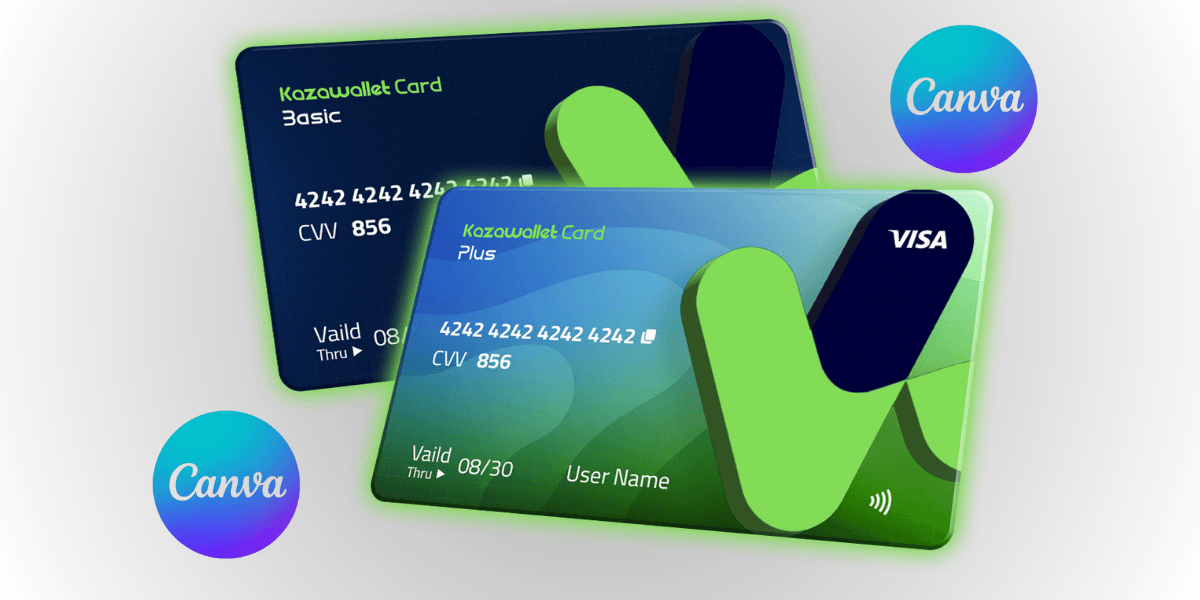
As a designer, marketer, or digital content creator, you need a flexible international Visa card that accepts crypto top-ups to cover your professional tool subscriptions online and bypass complex local payment restrictions.
Kazawallet gives you the perfect solution for restriction-free productivity:
Convert Your Digital Earnings into Creative Tools: If you earn your freelance income or profits in cryptocurrencies like USDT, you can use this digital income directly to pay for your professional Canva subscriptions without having to go through complex cash-out processes or look for peer-to-peer brokers.
Full Support for All Canva Plans and Subscriptions: The Canva platform seamlessly accepts Kazawallet virtual cards powered by the international Visa network, allowing you to activate individual Canva Pro plans or Canva for Teams to share the design workspace with your colleagues.
Low Fees and Total Transparency: Card top-up fees are low and fixed at 1.5%, with high daily limits that match your diverse technological subscriptions without any hidden calculations or conditions.
Instant Control and Security: The card is protected by the advanced 3D Secure system; you will receive a verification code (OTP) via your registered email to confirm the subscription process, with the ability to freeze the card instantly from the app with a single tap to protect your balance after activating your account.
You can read the full guide on Kazawallet card features, fees, and limits
Key Requirements Before Activating the Subscription
To ensure your payment to Canva is processed and the card is successfully accepted on the first try, make sure you have the following ready:
- A verified Kazawallet account: To use deposit and card services, your account must be fully verified (KYC).
- Digital currency balance: Whether this balance is already in your Kazawallet (like BTC, ETH, SOL…), or you have digital currencies in an external wallet that you will deposit now.
- Kazawallet card: The card must be ready to use. If you don’t have one, follow the guide on how to create a Kazawallet card.
An Active Account on the Canva App or Website (Canva.com).
How to Subscribe to Canva Pro Using Crypto
The process is simple and consists of two phases: preparing and topping up your card with a digital balance, then subscribe to Canva Pro using crypto
Phase 1: Preparing and Topping Up Your Kazawallet Card with Crypto
Convert your cryptocurrencies into a USD balance ready for use:
- Deposit: Deposit the crypto you own (USDC, LTC, BNB, TRON, BTC, ETH, SOL, USDT, Toncoin) into your Kazawallet account. (Read How to Deposit Crypto into Kazawallet)
- Exchange: Go to the “exchange” section and exchange this crypto into a (USDT, USDC, or USD) balance.
- Top-up your Card: Top up your Kazawallet card with the balance you got from the previous conversion.
Your card is now topped up with a crypto-funded balance and is fully ready to cover your creative purchases.
Phase 2: Activate Canva Pro Plan
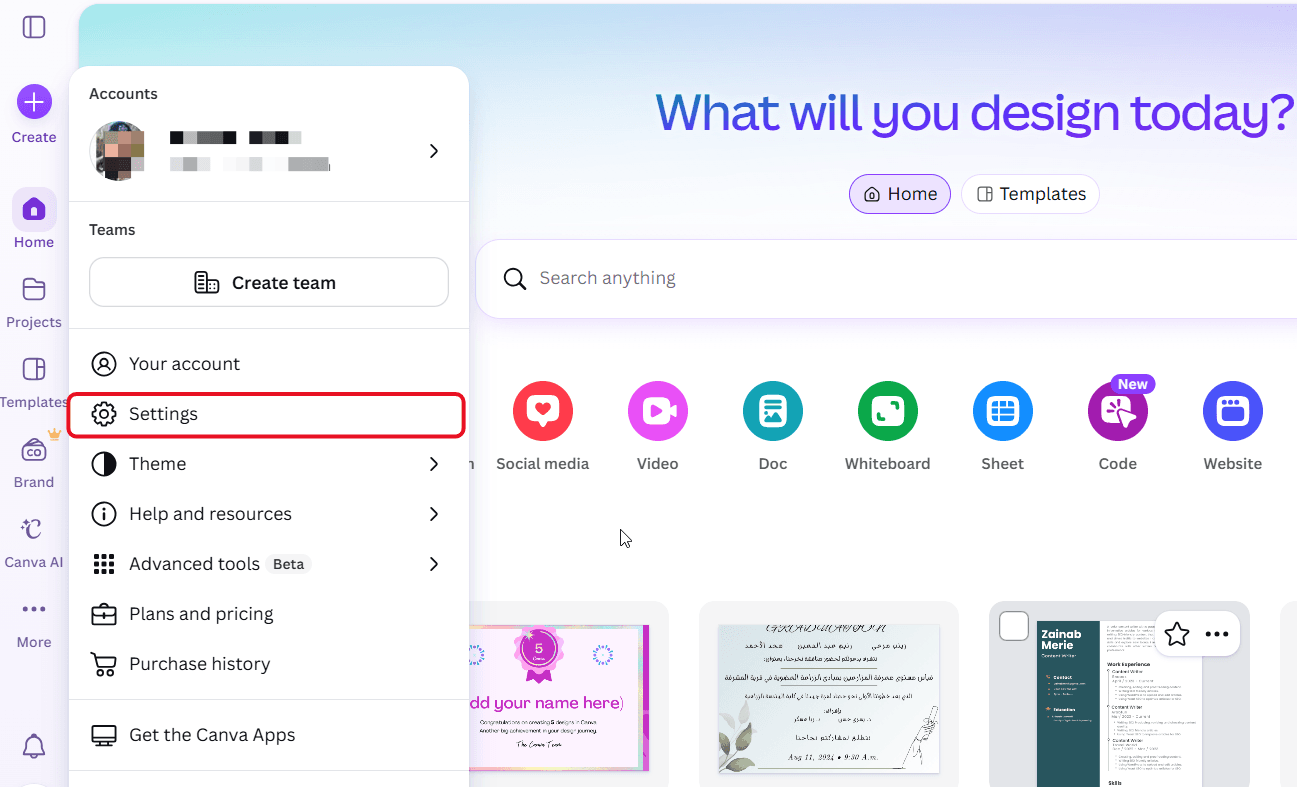
- Go to canva.com or open the app and log in to your account.
- Go to Settings.
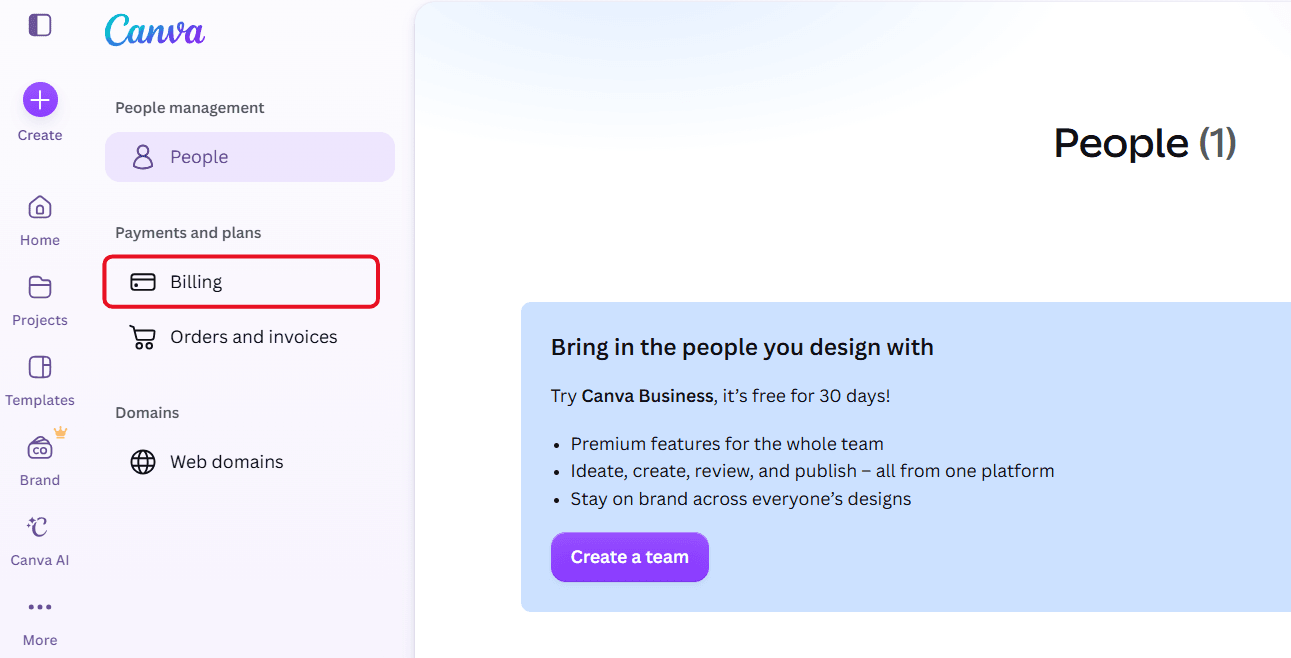
- Click on Billing.
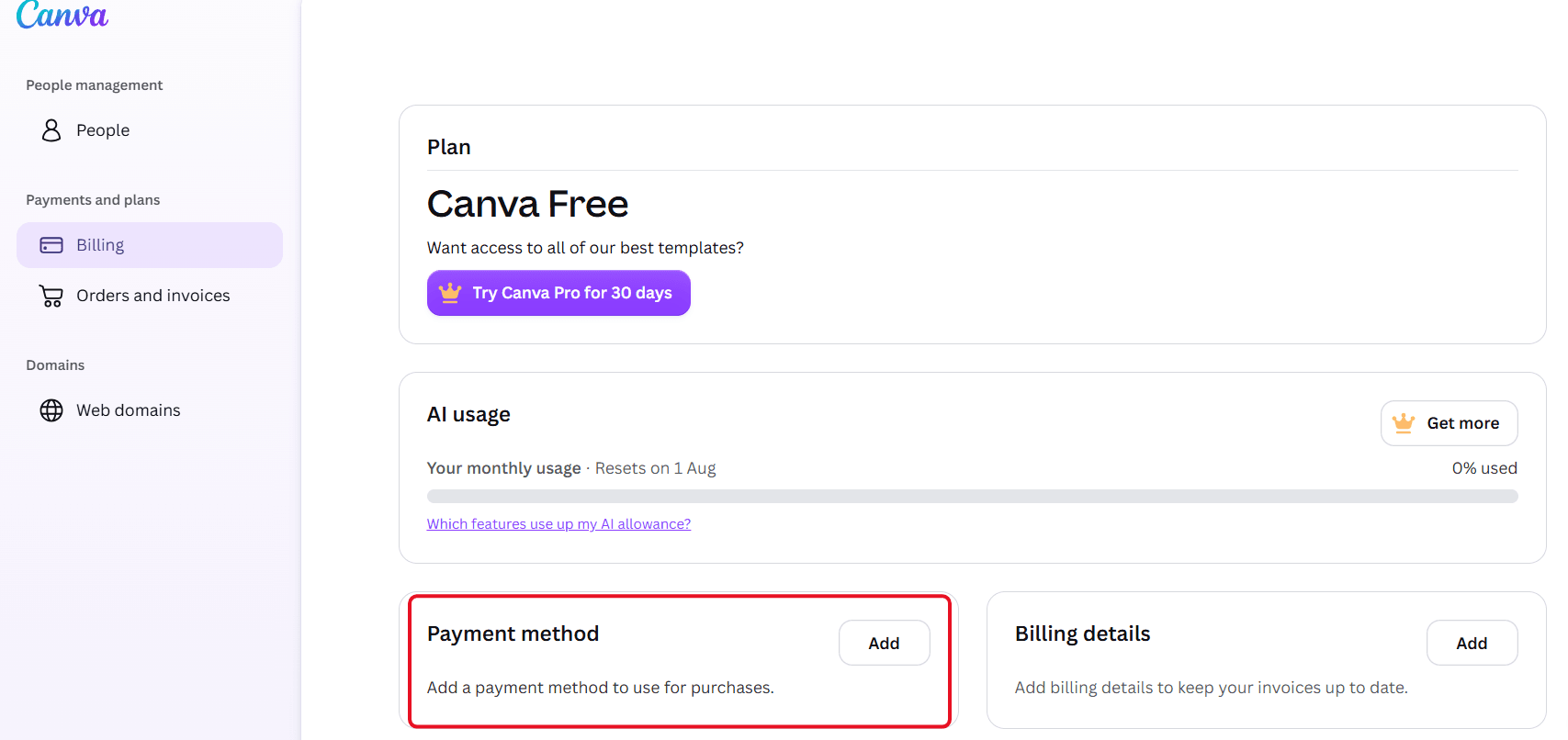
- Scroll down to the "Payment method" tab, then click on the "Add" button.
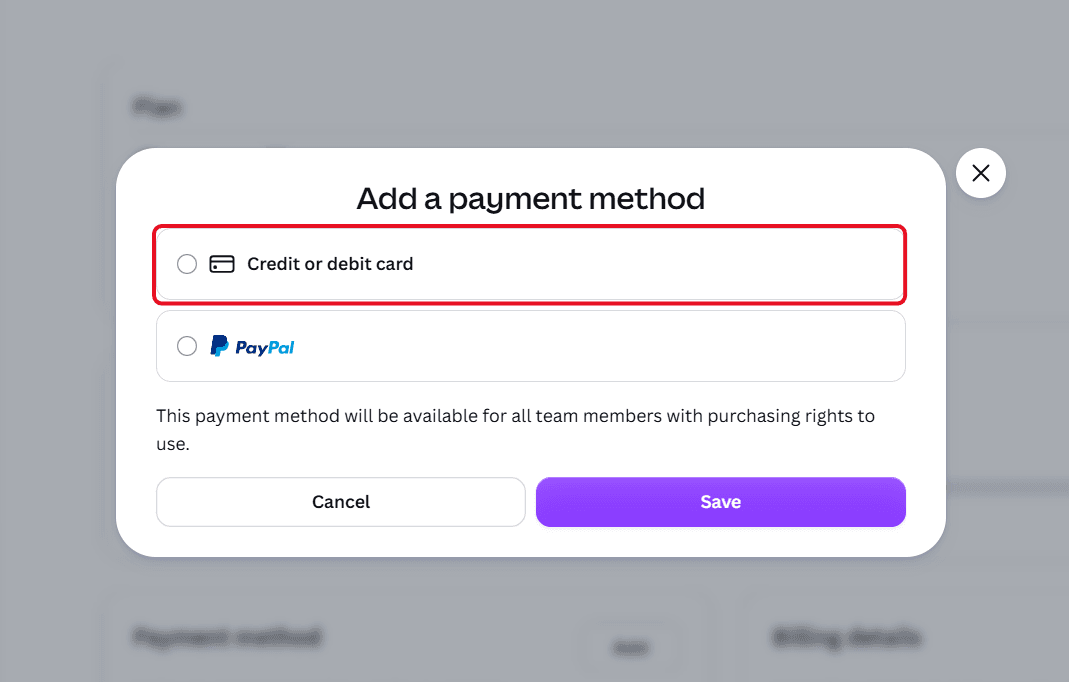
- Choose payment via "Credit or debit card".
- Open your Kazawallet app and copy your card details (the 16-digit number, expiry date, and CVV code). (For more details, read our guide: How to View Kazawallet Card Details).
- Make sure to write your name and billing address
Review our guide on how to fill in the Kazawallet card billing address to ensure the process is successful.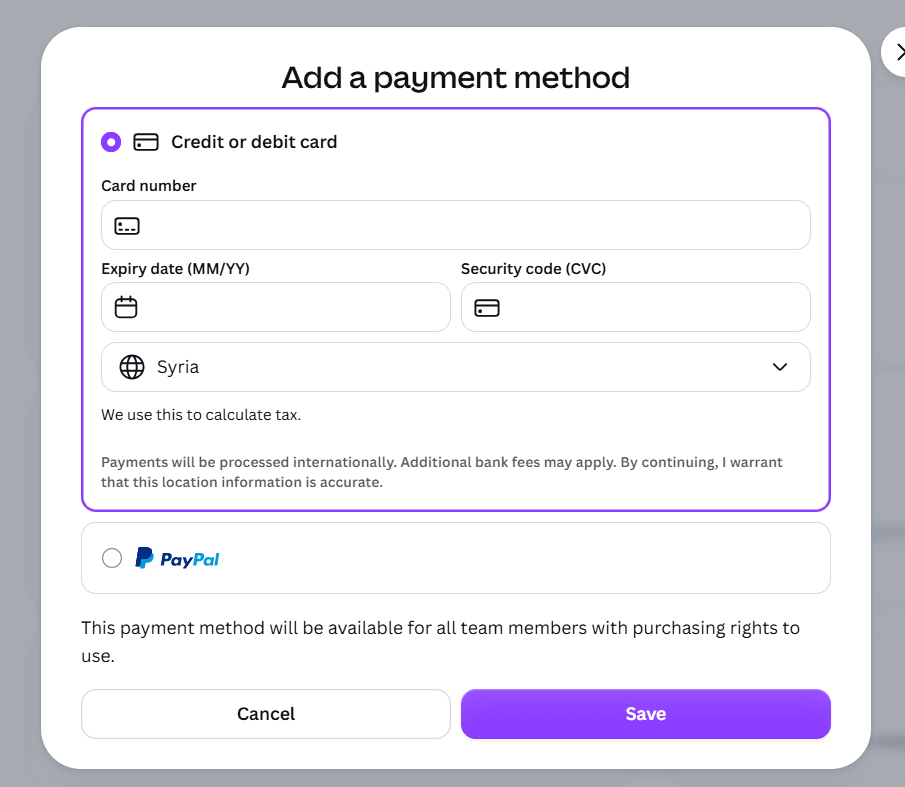
- Click on the "Save" button.
Frequently Asked Questions (FAQ)
Can I use the Kazawallet card to subscribe to Canva Pro while in Syria?
Yes, you can issue a virtual Kazawallet card and top it up with cryptocurrency entirely from within Syria, and use its details to activate your Canva Pro account. This allows you to design without restrictions and without needing a traditional bank account.
What cryptocurrencies are supported for topping up the Kazawallet card?
Kazawallet supports a wide range of major cryptocurrencies such as Bitcoin, Ethereum, USDT, USDC, SOL, BNB, LTC, TRON, and Toncoin. You can deposit any of them for free, and swap them in seconds within the app to a USD balance ready for top-up and use.
Are there extra conversion fees if the Canva subscription is in a currency other than USD?
The card is funded with a USD balance and is globally accepted. If your account is priced in USD, there are no extra fees. However, if your account is located in a region priced in Turkish Lira (TRY) or Euros (EUR), the Visa network will automatically convert the currency upon payment, applying standard foreign transaction fees (FX Fee of 2.5%).
What's Next?
Unleash your ideas and creative designs today without financial hurdles or geographical borders.
Order your Kazawallet Visa card now, top it up with your favorite cryptocurrencies, and start activating your Canva Pro subscription instantly and with total ease!